AWS Permissions: What the Spotto Role Can Read
This page explains what SpottoReadOnlyRole can and can't do in your AWS accounts. The exact policy documents are generated for your company and shown in the role instructions, CloudFormation template and setup package. Always deploy those rather than copying JSON from this page.
Access Levels
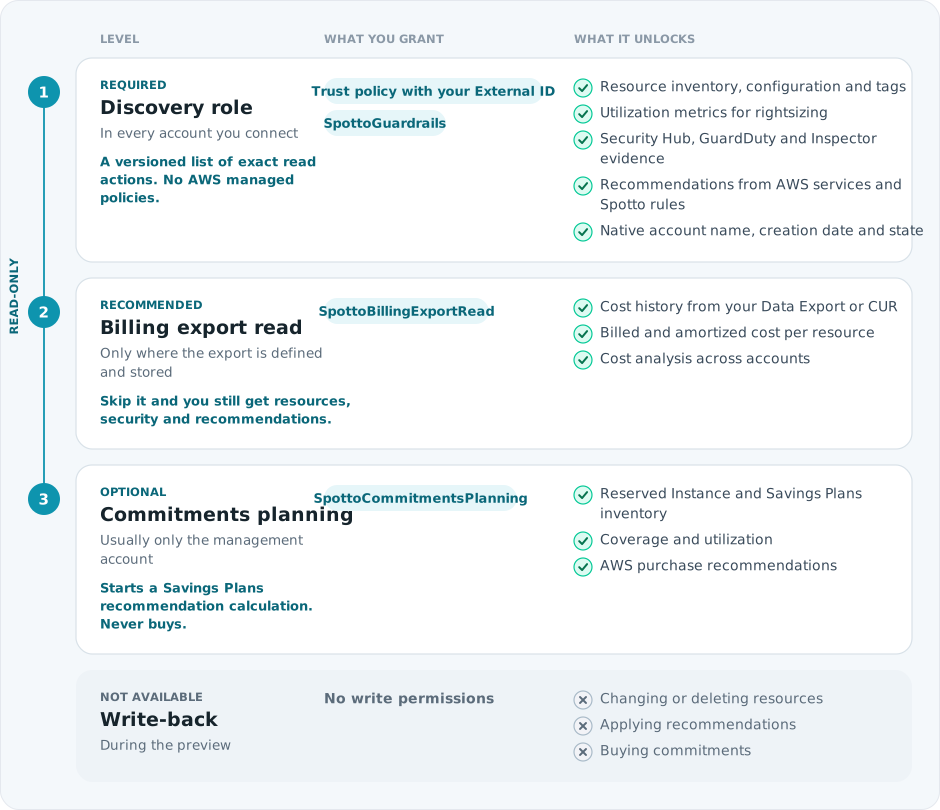
Which accounts get levels 2 and 3 depends on their duties. See what each account's role contains.
Trust Policy
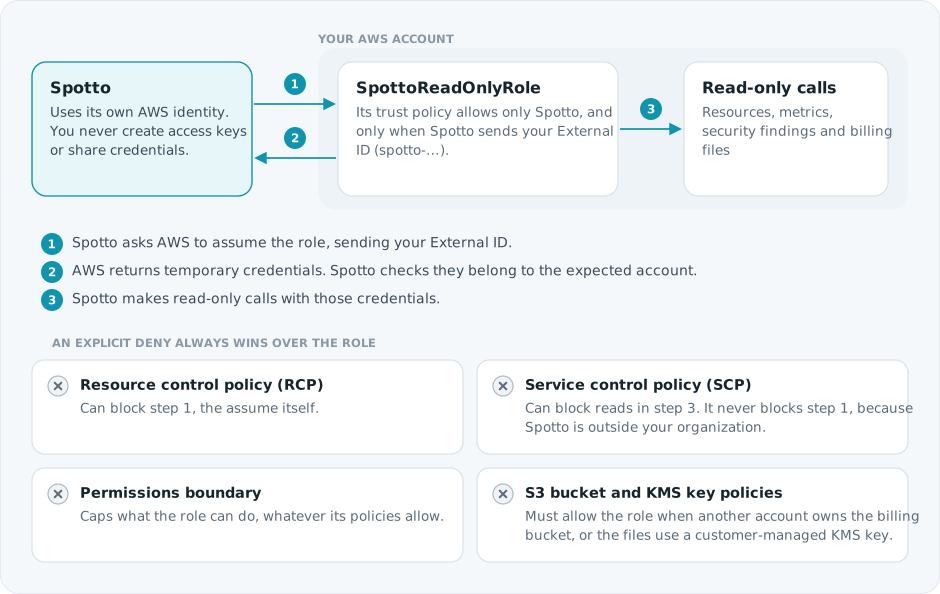
The trust policy is a single statement that allows sts:AssumeRole from Spotto's AWS principal with the condition sts:ExternalId. Your External ID starts with spotto-, is the same for all of your accounts and never changes. The temporary credentials from step 2 stay inside Spotto.
What Spotto Reads, And What It Never Reads
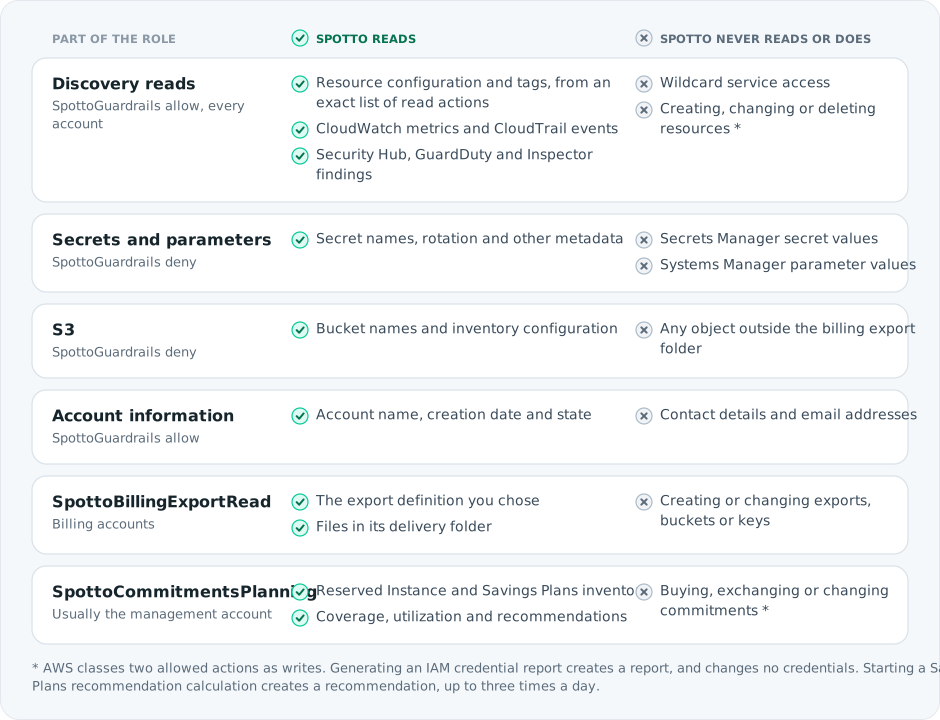
The sections below list the exact actions behind each row.
Read-Only Discovery Policies
The generated SpottoGuardrails policy grants an explicit, versioned list of the inventory and security operations Spotto uses. The role instructions show the policy version. New collection operations require an updated policy; Spotto does not grant wildcard service actions or attach AWS ReadOnlyAccess or SecurityAudit managed policies.
The discovery policy also allows iam:GenerateCredentialReport so Spotto can request an IAM credential report. This starts report generation without creating or changing IAM credentials. See AWS credential reports. The separate commitments policy can start a recommendation calculation, as described below. These permissions do not allow applying recommendations, buying commitments or changing customer resources.
Update an existing role
For manual or script-managed roles, apply the current generated inline policies and verify effective access and collection in Spotto before removing the old ReadOnlyAccess and SecurityAudit attachments. Both setup scripts warn about those attachments when the package no longer requests them, but do not detach them. Use the tool that owns the role to remove them after validation. Keeping those attachments retains their broader permissions; downloading new instructions does not change an existing role.
For Terraform-managed roles, applying a current package automatically removes those legacy attachments when they are tracked in the module's state. Review the plan before applying; unmanaged attachments remain unchanged. See changing Terraform-managed access.
If a required read is denied, Spotto reports unavailable coverage for the affected data. Check the generated action list and any explicit denies before changing permissions.
The current generated read policy includes ce:GetCostForecast for native cost
forecast evidence and ce:GetDimensionValues to qualify Savings Plan types.
These operations read billing data; they do not purchase commitments or change
resources. An older installed role may need the current generated policies
before those sources become available. Coverage and utilization have separate
evidence requirements, so a denied type-discovery read can leave valid coverage
visible while utilization remains unavailable. Apply role changes through the
AWS administrator and the tool that owns the role.
Guardrail Policy
SpottoGuardrails contains both the discovery allowlist and explicit denies:
- Allow
account:GetAccountInformation, so Spotto can show the native AWS account name, creation date and state. Spotto does not grant the account contact or email APIs. - Deny reading secret values:
ssm:GetParameter,ssm:GetParameters,ssm:GetParameterHistory,ssm:GetParametersByPath,secretsmanager:GetSecretValueandsecretsmanager:BatchGetSecretValue. Spotto can still read metadata such as names and rotation dates. - Deny
s3:GetObject*on all objects. In the billing storage account, the deny instead covers everything except the billing export's delivery folder.
Because the S3 deny depends on the billing configuration, replace the whole SpottoGuardrails policy when billing changes. Don't add a second copy alongside the old one: the old deny would still block billing reads.
Billing Export Access
SpottoBillingExportRead is added only to accounts with a billing responsibility.
Export Definition Account:
bcm-data-exports:ListExportsto list exports.bcm-data-exports:GetExporton the exact Data Export ARN, never a wildcard.cur:DescribeReportDefinitionsfor legacy CUR, or before an export has been selected.
S3 Storage Account:
s3:GetBucketLocationon the bucket.s3:ListBucket, limited to the export's delivery folder:<base prefix>/<export or report name>, or just the name if the export has no prefix.s3:GetObjecton files in that folder.kms:Decryptandkms:DescribeKeyon the KMS key, added when you enter the export's KMS key ARN. The delivered files must be encrypted with that key, and the key policy must also allow the role.
None of these permissions can create, change or delete exports, buckets or keys.
Optional Storage Inventory Report Access
Storage Inventory assessment reads an existing AWS Inventory report separately from the normal account sync. It does not require access to source application-object contents or permission to create an Inventory configuration.
For this optional workflow, the AWS administrator must permit
s3:GetInventoryConfiguration on the source bucket, s3:ListBucket limited by
s3:prefix to the selected report's destination subtree, and s3:GetObject
only on that subtree's manifests and report data. Customer-managed SSE-KMS
report encryption also requires kms:Decrypt on the exact key, with a key
policy that permits the role. A cross-account report destination must permit
the role through its bucket policy. See AWS SSE-KMS read permissions.
The default generated guardrail described above denies object reads outside
billing exports. A separate Allow cannot override that deny: maintain a
narrow exception for the exact Inventory report subtree in the role's owning
policy, preserving the billing exception and protection of all other objects.
The standard role setup does not automatically grant access to an arbitrary
Inventory report destination. Keep this optional access in the tool that owns
the role; do not grant broad object reads or remove the guardrail.
See the AWS Storage Inventory setup and assessment guide for required report fields, the separate Assessments action, delivery timing and blocked-report troubleshooting. These report-only permissions do not enable native object/version scans, recurring assessments or AWS write operations.
Commitments Planning
SpottoCommitmentsPlanning is optional. It's added to accounts where you select Organization Commitments Planning:
organizations:DescribeOrganization, to confirm the organization's identity. Spotto doesn't list the organization's accounts. The discovery allowlist reads each connected account's own Organizations entry, its parent organizational unit, delegated administrators and attached policies.savingsplans:DescribeSavingsPlansandec2:DescribeReservedInstances, for commitment inventory.ce:GetSavingsPlansCoverage,ce:GetSavingsPlansUtilization,ce:GetReservationCoverageandce:GetReservationUtilization.ce:GetSavingsPlansPurchaseRecommendationandce:GetReservationPurchaseRecommendation.ce:StartSavingsPlansPurchaseRecommendationGenerationandce:ListSavingsPlansPurchaseRecommendationGeneration.
AWS classes StartSavingsPlansPurchaseRecommendationGeneration as a write action because it starts a new recommendation calculation. It doesn't buy a Savings Plan, add one to a cart or change an existing commitment. AWS allows it up to three times a day per billing family.
What Can Still Block Access
An IAM Allow never overrides an explicit deny. The trust policy diagram shows the controls that can stop Spotto even when the role is correct: resource control policies (RCPs), service control policies (SCPs), permissions boundaries, S3 bucket policies and KMS key policies.
If one of these blocks Spotto, scope an exception to the exact SpottoReadOnlyRole ARNs rather than relaxing the control for everyone. Spotto reports denied reads per account, so you can see what's affected.
Spotto Portal Permissions Are Separate
AWS IAM controls what Spotto can read. Spotto permissions control who in your company can see the data and manage cloud accounts. Changing one doesn't affect the other. See access and permissions.