Azure Portal Extension: Autopilot Setup & Usage
Overview
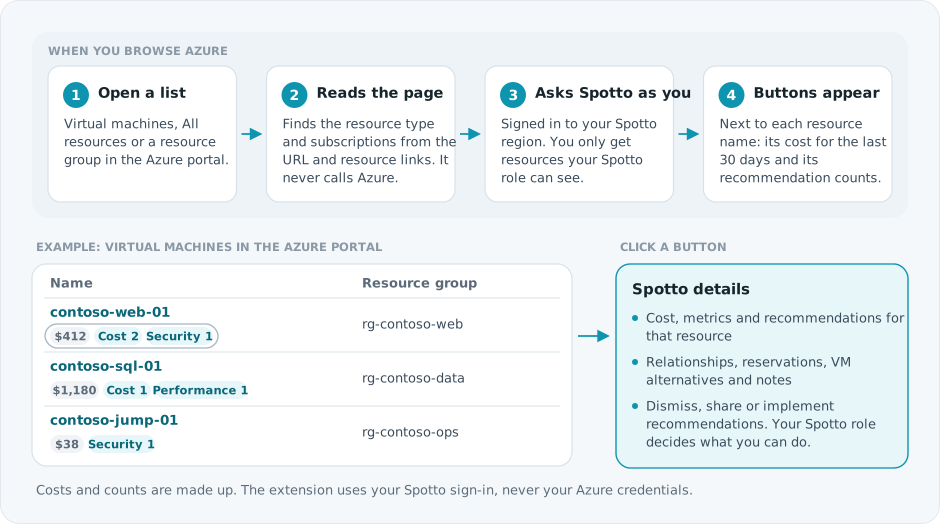
The Spotto Autopilot extension shows Spotto's cost and recommendations inside the Azure Portal, next to the resources you are already looking at.
Installation
The extension is available for Chrome and Edge (the same extension works for both):
- Open the link above.
- Select Add to Chrome (or Add to Edge) and confirm.
- The Spotto icon appears in your browser toolbar.
Connect Your Account
You need a Spotto account with at least one connected Azure subscription.
- Select the Spotto icon in your browser toolbar.
- Choose your Spotto region (United States, Europe or Australia).
- Sign in with your Spotto account.
Then open the Azure Portal and browse to a list of resources.
Using the Extension
The buttons appear on Azure resource lists, including All resources, a resource group's resources, and service lists such as Virtual machines, Storage accounts, SQL servers, App Services and Kubernetes services. A resource with no cost and no recommendations gets no button. A button with a cost but no recommendations shows the cost only and doesn't open.
Use the toolbar popup to choose which recommendation categories show on the buttons, switch between compact and full labels, hide resources with no cost, or show only resources with Spotto's own recommendations.
Actions you take in the details window, such as dismissing or implementing a recommendation, go through Spotto and follow your Spotto role, as they do in the Spotto Portal.
Privacy & Security
- The extension runs on Azure Portal pages (
*.azure.comand*.azure.net, which includes the portal's embedded frames). - It never reads or uses your Azure credentials. It signs in with your Spotto account.
- Everything it shows comes from Spotto's analysis. It does not call Azure APIs.
- No browsing data outside the Azure Portal is collected or transmitted.
Troubleshooting
Extension not showing data
- Check you're signed in (select the toolbar icon).
- Check the Azure subscription is connected in your Spotto account and your Spotto role can view its resources.
- Refresh the Azure Portal page.
- The resource may not have been analyzed yet. New resources can take up to 24 hours to appear.
"Not connected" message
- Select the Spotto toolbar icon and sign in.
- If you're already signed in, sign out and back in, and check you chose the right region.
- Clear browser cache and cookies for
spotto.aiif issues persist.
Data looks outdated
Spotto analyzes your Azure environment periodically. Cost data typically updates daily, while recommendations refresh as changes are detected. For the most current data, check the Spotto Portal directly.
Feedback
Found an issue or have a suggestion? Let us know at [email protected] or through the Contact Us page.