AWS Billing Exports: Data Exports and CUR
Spotto reads AWS cost data from a billing export that AWS delivers to S3: an AWS Data Export (recommended) or a legacy Cost and Usage Report (CUR). Billing is optional. Without it, Spotto still shows resources, security and recommendations, but no costs.
Spotto uses an export you already have. It never creates or changes exports, buckets or KMS keys. Adding billing takes three steps:
- Find your export details in AWS.
- Add the billing source in Spotto.
- Give the roles billing access.
No export yet? See create a billing export first.
How Spotto Reads A Billing Export
Up to three accounts are involved. They're often the same account:
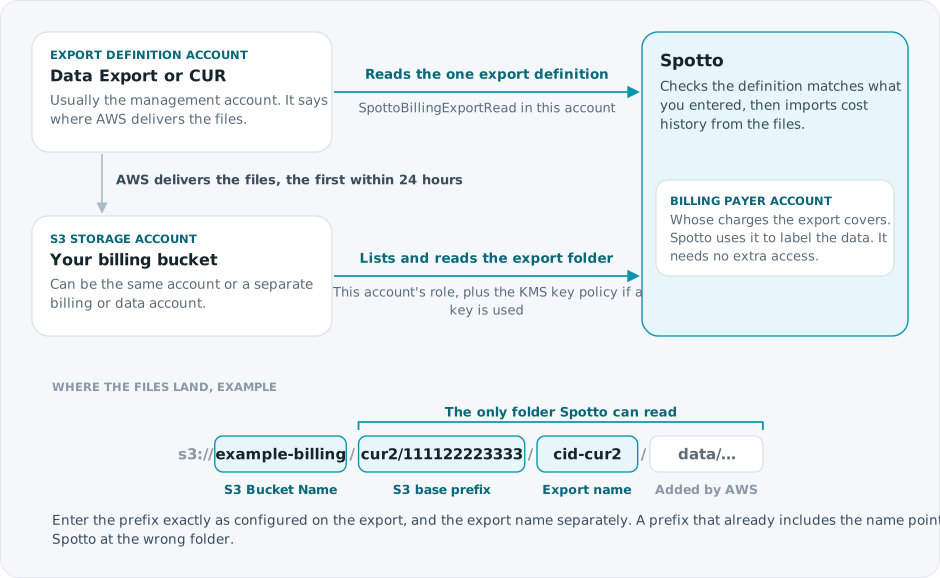
For a standalone account, all three are the same account. In an organization, the export is usually defined in the management account, and sometimes delivered to a bucket in a separate billing or data account. All three must be accounts you've included in Spotto.
Step 1: Find Your Export Details
In the AWS console, sign in to the account where the export is defined, usually the management account. Open Billing and Cost Management > Data Exports and select your export. Copy:
| Spotto field | Where to find it |
|---|---|
| Data Export ARN | The export's ARN |
| Data Export Name (Export.Name) | The export name, such as cid-cur2 |
| S3 Bucket Name | The destination bucket, without s3:// |
| AWS-Configured S3 Base Prefix | The destination path prefix, exactly as shown. Leave it empty if the export delivers to the bucket root. |
| S3 Bucket Region | The destination Region |
AWS delivers files to <base prefix>/<export name>/.... Enter the prefix and the export name separately, as in the example path above. A prefix that already includes the export name points Spotto at the wrong folder.
You also need two values only in some setups:
- KMS Key ARN: only if the bucket encrypts files with a customer-managed KMS key. Check the bucket's Properties > Default encryption in the S3 console. If it shows a key you manage, copy the full key ARN, not an alias.
- S3 Bucket Owner Account ID: only if a different account owns the bucket than the account whose role will read it.
Prefer the AWS CLI?
Run these in AWS CloudShell in the account where the export is defined:
aws bcm-data-exports list-exports --region us-east-1
aws bcm-data-exports get-export --export-arn <export-arn> --region us-east-1
From get-export, copy Export.ExportArn, Export.Name, and under Export.DestinationConfigurations.S3Destination, S3Bucket, S3Prefix and S3Region.
For a legacy CUR, run aws cur describe-report-definitions --region us-east-1 and copy ReportName, S3Bucket, S3Prefix and S3Region.
To check for a KMS key, run aws s3api get-bucket-encryption --bucket <bucket-name>. If SSEAlgorithm is aws:kms and KMSMasterKeyID is a key you manage, get its full ARN with aws kms describe-key --key-id <value> --query KeyMetadata.Arn.
Step 2: Add The Billing Source In The Portal
On the AWS setup page, go to the Billing step:
- Select Add Billing Source.
- Choose the Export Type: AWS Data Exports (Recommended) or Legacy Cost and Usage Report (CUR).
- With more than one account, choose the Export Definition Account, Billing Payer Account and S3 Storage Account.
- Under Data Export Details, enter the values from step 1. For a legacy CUR, enter the Legacy CUR Report Name instead of the ARN and export name.
- With more than one account, choose the Billing Coverage: All Accounts, or Selected Accounts if the export covers only some of them.
Then select Create or Update. Spotto checks that the export definition matches what you entered.
Step 3: Give The Roles Billing Access
The export definition account and the S3 storage account need billing permissions in their roles.
- Not deployed the roles yet? Nothing extra to do. Deploy them now, as in deploy the role, and they include billing access.
- Already deployed them? Redeploy those two accounts' roles: download their new CloudFormation templates and update the stacks, or download a new setup package and run the Bash wizard, PowerShell wizard or Terraform module again.
Two AWS policies outside the role may also need a change:
- KMS key policy: if you entered a KMS key, the key policy must allow the storage account's role to use
kms:Decryptandkms:DescribeKey. The role's own permissions aren't enough for KMS. - S3 bucket policy: if another account owns the bucket, its bucket policy must allow the storage account's role.
The exact permissions are in AWS permissions Spotto needs.
Create A Billing Export
If you don't have an export yet, create one in the management account so it covers every account in the organization:
- In Billing and Cost Management > Data Exports, select Create.
- Choose Standard data export with the CUR 2.0 table, and the Parquet format.
- Choose an S3 bucket for delivery, then create the export.
See the AWS guide to creating Data Exports. AWS can take up to 24 hours to deliver the first files. You can add the export to Spotto straight away.
Discover A Data Export Instead
If you can't get the export details yourself, Spotto can list the exports for you. It takes two rounds in AWS, because the role has to exist before it can see your exports:
- Deploy the export definition account's role first, without billing.
- Add the billing source in Spotto and choose the Export Definition Account. Leave the export details empty.
- On Deploy Access, choose Manual IAM. For that account, select Generate Role Instructions and add the first
SpottoBillingExportReadpolicy to its role. It can only list exports. - Back on Billing, under Or Discover Data Exports from AWS, select Discover Exports, and choose your export under Discovered Export.
- On Deploy Access, select Generate Role Instructions again and replace
SpottoBillingExportReadwith the new version, which can read only the export you chose. - On Billing, select Validate Export Destination. Spotto fills in the S3 destination.
Download Setup Package, for Bash, PowerShell or Terraform, stays disabled until every billing source has its export details, so with those tools you run them once before discovery and once after.
Waiting For The First Files
If AWS hasn't delivered any files yet, the billing source waits. It isn't flagged as a problem, and scanning carries on. Spotto starts importing costs as soon as files appear. If nothing arrives within 24 hours, check the export's status in Billing and Cost Management > Data Exports, and that it delivers to the bucket and prefix you entered.
Troubleshooting
See billing source needs attention for validation, KMS and discovery errors.