Spotto MCP: Connect AI to Azure Cost Data
Overview
The Spotto MCP server connects AI assistants to your Spotto cost, resource, recommendation, and security data. You ask questions in natural language instead of copying data into prompts. The Model Context Protocol (MCP) is an open standard for connecting AI assistants to external data sources.
How it works
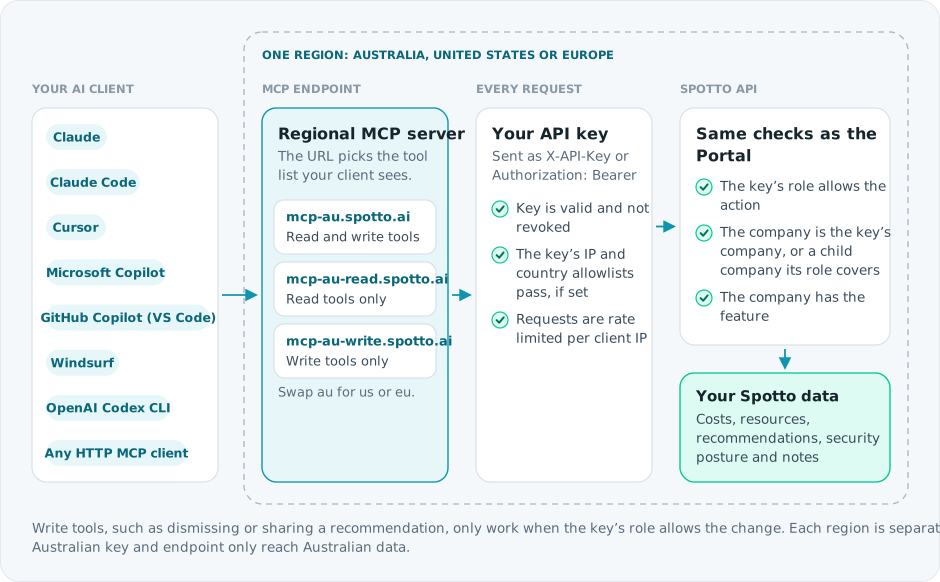
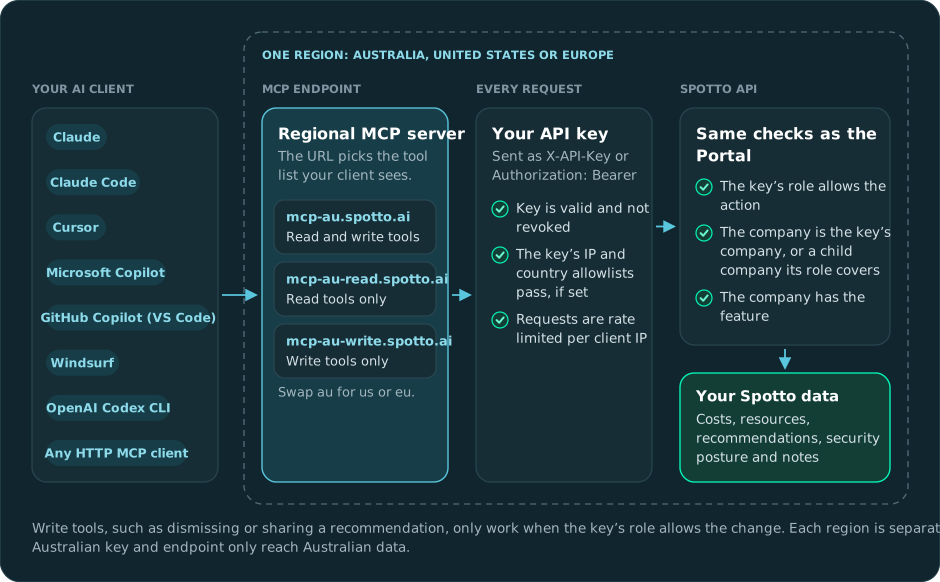
Your AI client calls the Spotto MCP server in your region, which calls the Spotto API with your API key.
- Generate an API key in the Spotto Portal and choose its role. See API Authentication.
- Configure your AI client with your regional endpoint and the key. Setup guides: Claude, Claude Code, Cursor, Microsoft Copilot, GitHub Copilot (VS Code), Windsurf, OpenAI Codex CLI, and any HTTP client.
- Start asking questions about your cloud environment.
Use the endpoint for the region where your Spotto account was created. Start with full, and switch to read if your client struggles to load the tool list. Every regional URL is listed in MCP Endpoint Profiles.
All traffic uses HTTPS, and the MCP server runs on Cloudflare's edge network. The key's own role decides what it can do, not the role of the person who created it. For the underlying API, see the Spotto API documentation.
What Can You Do?
Cost Analysis
Ask about spending patterns, anomalies, and where your money goes.
"What's driving the cost increase in my production subscription this month?"
"Show me a breakdown of storage costs across all resource groups"
"Which resources have the highest spend this week?"
Resource Management
Browse your Azure inventory, get resource details, and track configuration changes.
"List all VMs in the analytics resource group with their current costs"
"What's the configuration of my SQL database server-prod-01?"
"Are there any Azure service retirements I need to plan for?"
Recommendations
Find cost-saving, security, and optimization opportunities, then act on them.
"What are my top 5 cost-saving recommendations?"
"Dismiss the VM rightsizing recommendation for batch - server—we need the capacity for month-end processing"
"Share the storage optimization recommendations with the infrastructure team on Slack"
Security Posture
Check your secure score and review security recommendations.
"What's my current secure score across all subscriptions?"
"Show me high-priority security recommendations"
Troubleshooting
Tools aren’t showing up in my client
What you're seeing: The MCP server connects but your client shows no tools (or none from Spotto). Likely causes:
- The MCP server URL is wrong for your region.
- The API key is missing/invalid.
- The endpoint profile is wrong for the client, or the client cannot load the full catalog. How to fix:
- Confirm the URL against Regional Endpoints.
- If your client struggles to retrieve tools, switch from the default
fullendpoint to the regionalreadendpoint. - Verify the client is sending
X-API-Key: <YOUR_API_KEY>on every request. - Re-run the client setup steps in Client Setup.
I’m seeing tool-limit or retrieval errors
What you're seeing: The client reports errors such as "limiting number of tool calls to 70" or "couldn't retrieve the requested items". Likely causes:
- The client cannot handle the full Spotto tool catalog on one MCP server. How to fix:
- Change the MCP URL to the matching regional
readendpoint. - Restart the client or reconnect the MCP server.
- Test with a simple prompt such as "Check the Spotto API status".
I’m getting authentication failures
What you're seeing: Requests fail with 401/403 errors.
Likely causes: API key is revoked/rotated, restricted by IP/country, its company doesn't include the API & MCP Access feature set, or its role doesn't allow the action.
How to fix:
- Rotate the key in the Spotto Portal and update your client configuration.
- If you enabled IP/country restrictions, confirm your client’s outbound IP matches the allowlist.
- If only some tools fail with
403, check the key's role in the Portal.
Next Steps
- Getting Started — Generate an API key and test connectivity
- MCP Endpoint Profiles — Choose between
full,read, andwrite - Client Setup — Configure your preferred AI client
- Available Tools — Browse the full list of MCP tools
- Example Queries — See what kinds of questions you can ask