Azure Write Permissions: Automate Actions Safely
Overview
Spotto reads your Azure environment by default. Write permissions let actions you take in Spotto reach Azure. Each one is optional, uses its own custom role with only the actions it needs, and stays off until you turn it on. You can remove it at any time.
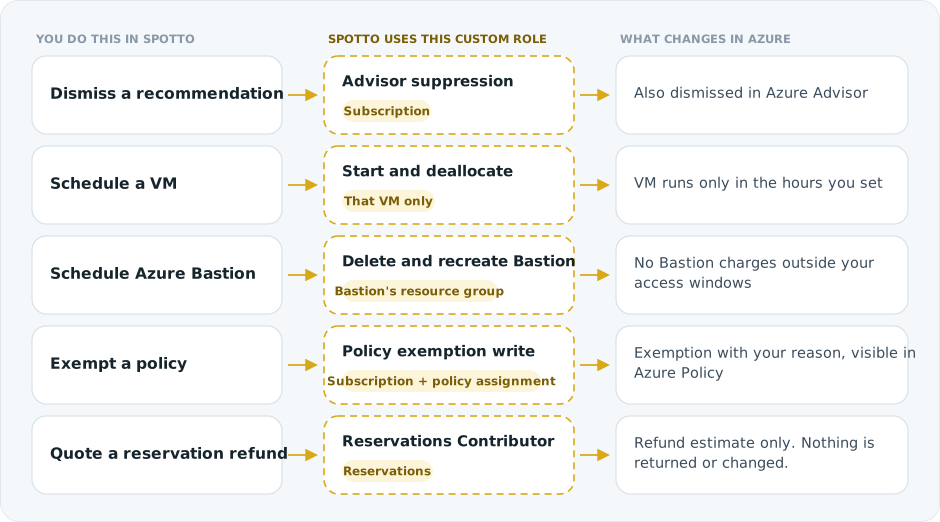
On the cloud account you choose Dismiss Azure Advisor Recommendations, Enable Storage Inventory Reports and Create Azure Policy Exemptions. Storage inventory analysis is reader-only today (see the access model). VM and Bastion schedule roles are approved when you activate a schedule; see Azure permissions. Remediation actions on recommendations also run with the write credential when one is set.
Spotto keeps working with read-only access if you prefer to make every change in Azure yourself.
Prerequisites
- An Azure cloud account registered in Spotto.
- Owner or User Access Administrator in Azure, so you can create custom roles and assign them.
- A choice between the same credentials or a separate write credential. See Configuration.
Next Steps
- Configure write permissions: choose credentials, tick features, validate
- Custom roles for least privilege: create the role from Spotto's JSON template
- Dismiss Azure Advisor recommendations
- Azure Policy exemptions
- Storage inventory access model and the Azure Storage Inventory feature guide
- Security best practices: rotate, monitor and revoke
- Troubleshooting
For further assistance, please Contact Us.