Connect AWS to Spotto (Preview): Choose a Path
Spotto enables AWS for a company on request. During the preview, Spotto only reads from AWS. It never changes resources, buys commitments or reads secret values. AWS counts two of the role's actions as writes, generating an IAM credential report and starting a Savings Plans recommendation calculation, but neither changes your resources. Contact us to join the preview.
Spotto connects to AWS by assuming a read-only IAM role, SpottoReadOnlyRole, that you create in each AWS account you want analysed. The role trusts Spotto only when Spotto presents your company's External ID. You never create access keys or share credentials with Spotto.
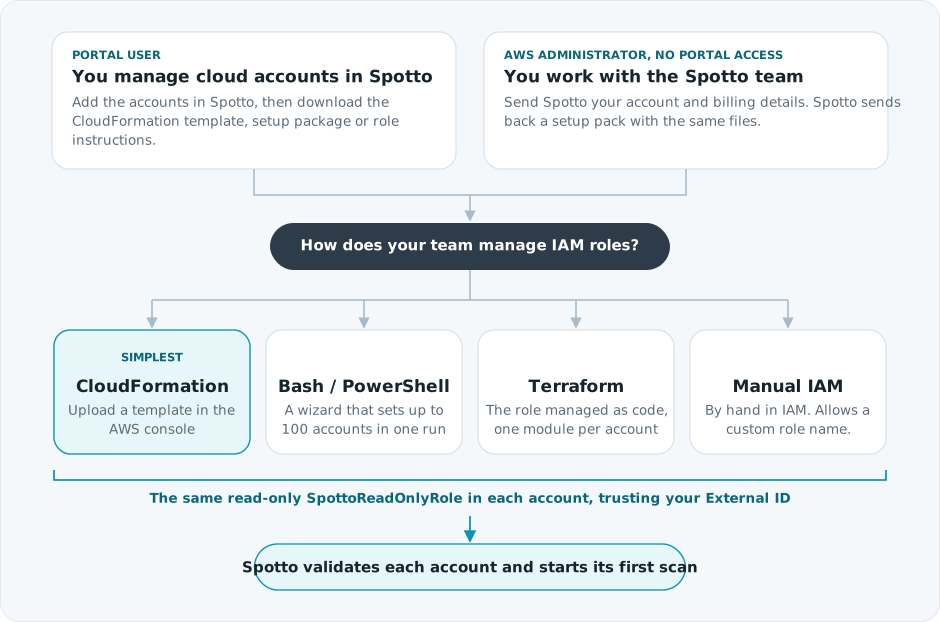
The setup is the same for one account or a whole organization; you just deploy the role more times. A company can connect up to 25 organizations or standalone accounts, with up to 100 accounts in each organization and 250 AWS accounts in total. Only the commercial AWS partition is supported, not AWS GovCloud (US) or the AWS China Regions.
Choose How To Get Started
| You are | Start here |
|---|---|
| A Portal user (company admin or MSP) with AWS enabled for your company | Configure AWS accounts in Spotto. You add the accounts in the Portal, deploy the roles, then select Create. |
| An AWS administrator working with the Spotto team, without Portal access yet | AWS setup for your AWS administrator. You send Spotto a few details, deploy what Spotto sends back, and Spotto connects the accounts for you. |
Choose How To Deploy The Role
Recommended: for one standalone account, use CloudFormation. For an organization, use the Bash or PowerShell wizard. If you manage IAM as code, use Terraform.
| Method | Best for | Get it |
|---|---|---|
| CloudFormation template | Standalone accounts and small organizations. No local tools needed. | A template for each account, downloaded from Spotto or included in your setup files. See step 1. |
| Bash wizard | Organizations with several accounts, Linux, macOS and the default AWS CloudShell Bash session. Up to 100 accounts in one run. | Get the Bash script and its README. It uses the same setup package and results format. |
| PowerShell wizard | Organizations with several accounts. Up to 100 accounts in one run, locally or in AWS CloudShell. | Get the script and its README. It needs the setup package from Spotto. |
| Terraform module | Teams that manage IAM as code. One module instance per account. | Get the module. It needs the same setup package. |
| Manual IAM setup | Custom role names or paths, or strict change processes | Role instructions from Spotto, with the exact trust policy and policies. |
None of these methods create AWS accounts, billing exports, S3 buckets or security services. They only create or update the IAM role.
What Spotto Needs From You
| Item | Required | What it is |
|---|---|---|
| The role in each account | Yes | SpottoReadOnlyRole with the trust policy and permissions Spotto generates for your company. See what the role can read. |
| The list of accounts | Yes | The 12-digit account IDs to connect. For an organization, also the organization ID and the management account, which must be one of the connected accounts. Spotto does not discover organization accounts automatically. |
| A billing export | No, but recommended | An existing AWS Data Export (CUR 2.0) or legacy Cost and Usage Report in S3. Without it, Spotto shows resources, security and recommendations but no cost data. See AWS billing exports. |
| Commitments planning | No | Extra Cost Explorer, Savings Plans and Reserved Instance reads, usually on the management account, for organization commitments planning. |
Standalone Account Or Organization
An AWS organization is a management account plus member accounts, and every account you include gets a role. Most companies connect this way. A standalone account is one AWS account on its own, so one role does everything. Each role contains the same discovery policies, plus billing or commitments access only where that account needs it. See what each account's role contains.
The billing export is often defined in the management account but delivered to a bucket in a separate billing or data account. You choose which of the included accounts defines the export and which one stores it. Two of the billing fields sound alike: the export definition account is where the Data Export is set up, and its role reads the export's settings; the billing payer account is whose bill the export covers, used only to label costs, so it needs no access. In most organizations both are the management account. A dedicated billing account is scanned like any other account.
You can also exclude organization accounts on purpose, such as sandbox or log archive accounts, and record why.
How Spotto Reads Your AWS Data
Spotto has no agent or network connection in your environment. It calls the same public AWS APIs you would, signed with the role's temporary credentials:
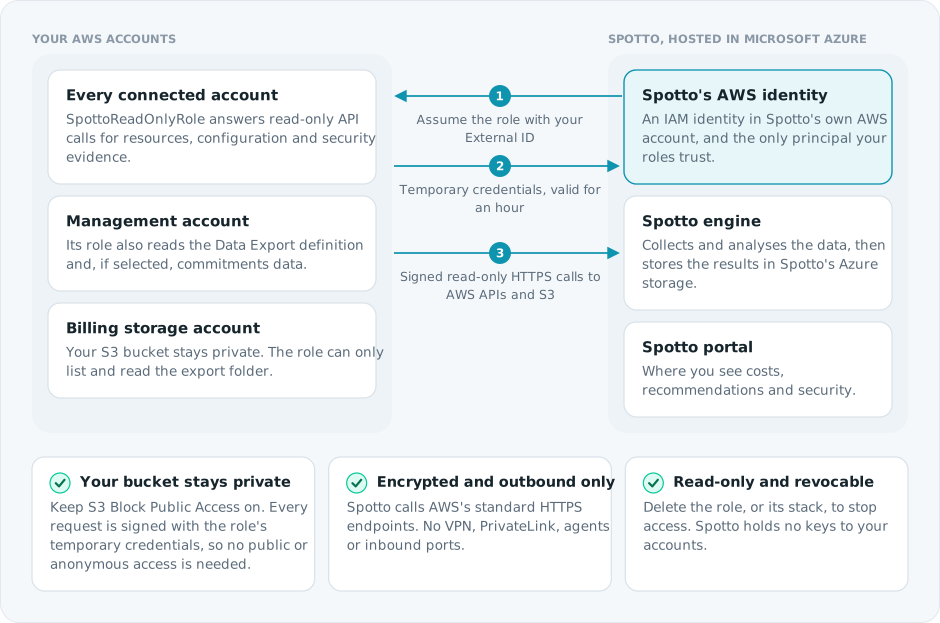
The billing bucket never needs to be public: Spotto reads it with the S3 API (ListObjectsV2 and GetObject) as your storage account's role. Two bucket policy patterns do block it, because Spotto connects from outside your network: a policy that only allows requests through your VPC endpoints (aws:SourceVpce), or only from listed IP ranges (aws:SourceIp). Exempt the storage account's SpottoReadOnlyRole ARN from those conditions. A policy that denies requests without HTTPS (aws:SecureTransport) is fine.
What Happens After You Connect
Spotto proves each role, checks each billing export, then scans every account whose role works. See create and check the status for the full sequence.
Resources, recommendations and security evidence appear when each account's first scan completes. Large organizations take longer. A new export can take up to 24 hours to deliver its first files. After that, Spotto refreshes AWS data automatically.
Some data depends on AWS services you control:
- Security score: requires Security Hub CSPM with a standard enabled and AWS Config recording. GuardDuty and Inspector findings appear when those services are enabled. See AWS security access.
- Recommendations: Trusted Advisor checks and AWS Health events need a paid AWS Support plan with API access, such as Business Support+ or Enterprise Support, or a legacy Business or Enterprise On-Ramp plan until it retires. Compute Optimizer and Cost Optimization Hub need to be opted in. Spotto's own rules work without them.