Companies: Manage Organizations
Companies lists every company you can access and your role in each. Open it from Settings -> Settings -> Companies. If you don't have a company yet, Spotto starts you on creating one.
Customer or container
Every company is either a customer or a container. You choose when you create it, and it can't be changed afterwards.
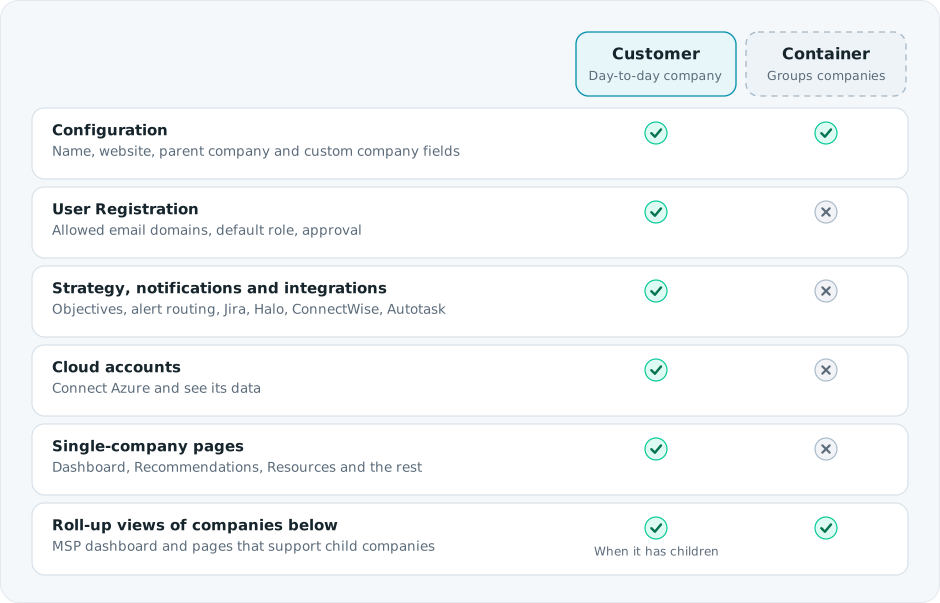
Use Customer for any company that connects cloud accounts or that people work in day to day. Use Container to group companies, for example by region, team or plan tier. See Parent-Child Companies for how the hierarchy works.
The companies list
- Search and sort by name. Selecting a row highlights it.
- Edit and Delete only appear on companies where you're a Company Administrator. Rows you can't edit don't open.
- You can't delete your only company. With more than one, Delete asks you to confirm.
Create a company
Select New. After you create it:
- In the onboarding wizard, Spotto takes you straight to adding a cloud account.
- Otherwise you return to the companies list.
Edit a company
Configuration (customer and container)
- Name (required) and Website (must look like a domain or URL).
- Custom property values: any company fields that apply, directly below Website. See Custom Properties.
- Classification: shown read-only after creation.
- Parent Company: shown when you can access more than one company. Choose another company you administer, or clear it to make this a root company. It can't be the company itself or one of its descendants, and can't make the hierarchy deeper than 10 levels. With an API key identity the parent may be locked to the key's company. Spotto asks you to confirm a parent change before saving.
User Registration (customer only)
- Allowed Email Domains: up to 5 valid, unique domains whose users can request access.
- Default Role for those new users. Spotto checks that you can assign the role and its child-company scope before saving it. Creating a child company does not expand your remaining delegation authority.
- Require Pending Approval: new users wait for approval before they get access.
Other company settings have their own pages under Settings, for customer companies only:
| Setting | What it covers |
|---|---|
| Strategy | Company objectives, from a short survey |
| Notifications | Where company events are sent |
| Integrations | Jira, Halo, ConnectWise and Autotask ticketing. Secrets are stored securely. |
| Custom Properties | Definitions for custom company and user fields |
Validation rules
- Default Company can't be used as a name.
- Websites and allowed domains must be valid, and domains can't repeat.
- A parent change can't create a loop or exceed the depth limit.
Troubleshooting
| What you see | Likely cause | What to do |
|---|---|---|
| No Edit or Delete buttons | You're not a Company Administrator of that company | Ask a Company Administrator to update your role |
| You can't delete a company | It's your only company, or it still has child companies | Create another company first, or move its children |
| Domain errors won't clear | A domain is invalid or listed twice | Use a plain domain such as example.com, once each |