Parent-Child Company Management
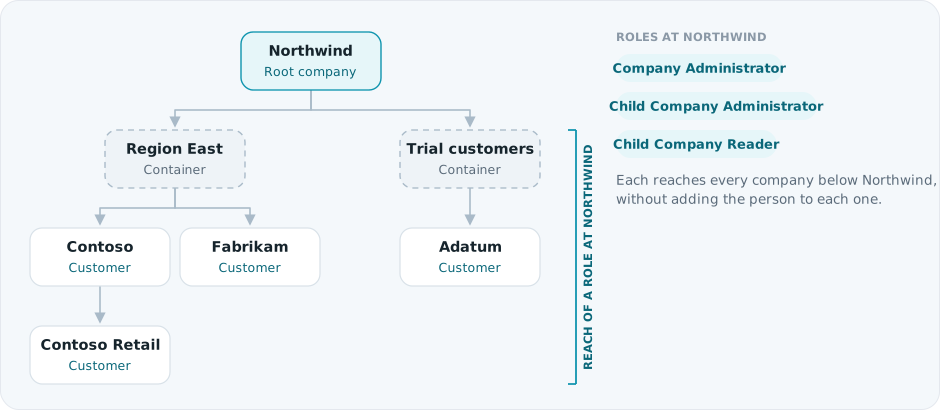
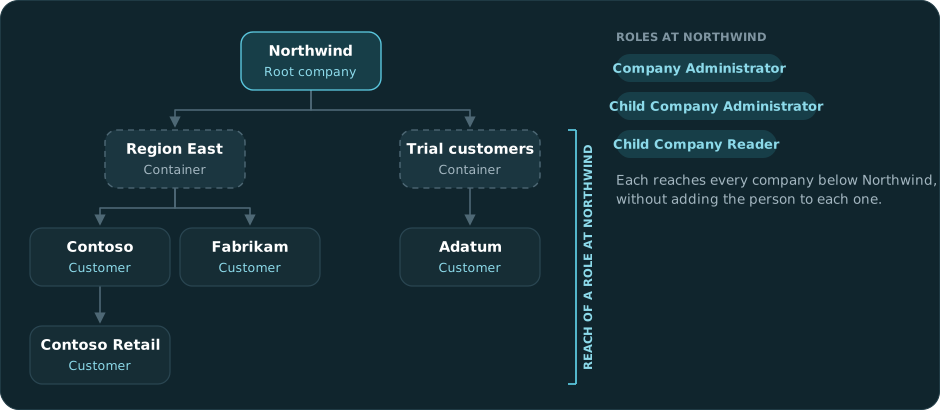
Spotto supports parent-child company relationships. This lets you create a hierarchical structure where a parent company manages one or more child companies - useful for managed service providers, organizations with multiple business units, or any setup requiring centralized administration across separate entities.
Overview
Parent-child relationships let you:
- Centralize management — Administer multiple companies from a single parent account
- Delegate access — Grant users permission to manage child companies without direct membership
- Maintain separation — Keep data and resources isolated between companies while enabling oversight
- Automate onboarding — Create new child companies programmatically via API
The hierarchy is limited to a single level. A parent company cannot have a parent of its own, and a child company cannot have children.
How It Works
When you create a new company in Spotto, you can optionally assign it to a parent company. This establishes a relationship where:
- The parent company gains administrative visibility over the child
- Users with appropriate roles in the parent can manage the child company
- The child company operates independently but remains linked to its parent
Key Concepts
| Term | Description |
|---|---|
| Parent Company | A root-level company that can have one or more child companies |
| Child Company | A company linked to a parent, inheriting administrative oversight |
| Child Company Administrator | A role that provides full administrative access to child companies |
| Child Company Reader | A role that provides read-only access to child companies |
Roles and Permissions
When a company becomes a parent (has at least one child company), two new roles become available:
Child Company Administrator
Users with the Child Company Administrator role in a parent company can:
- View all child companies under the parent
- Manage settings and configurations for child companies
- Add and remove users from child companies
- Connect cloud accounts to child companies
- Create new child companies
This role provides full administrative capabilities for child companies without requiring direct membership in each one.
Child Company Reader
Users with the Child Company Reader role can:
- View child company details and configurations
- Access dashboards and reports for child companies
- View cloud accounts and resources in child companies
This role provides read-only visibility across child companies—useful for auditors or stakeholders who need oversight without modification rights.
Company Administrators in the parent company automatically inherit Child Company Administrator permissions for all direct children.
Creating a Child Company
Via the Spotto Portal
- Navigate to Company Settings in the Spotto Portal
- Click Create Company
- Enter the company details (name, etc.)
- In the Parent Company field, select the parent company
- Click Create
The new company appears as a child of the selected parent.
Via API
When creating a company through the Spotto API, include the parentId parameter:
{
"name": "Child Company Name",
"parentId": "parent-company-uuid"
}
API-created companies automatically become children of the company associated with the API key. The parentId parameter in the request payload is ignored—the parent is always set to the API key's company.
Managing Parent-Child Relationships
Changing a Company's Parent
You can reassign a company to a different parent or remove the parent relationship:
- Navigate to the child company's Settings
- Edit the Parent Company field
- Select a new parent or clear the field to make it a root company
- Save changes
Requirements for changing parents:
- You need administrative access to both the current and new parent companies
- The new parent cannot already be a child company (no multi-level nesting)
- If removing the parent entirely, the company needs at least one user with Company Administrator access
Removing a Child Company
To remove a child company from a parent:
- Either reassign the child to a different parent, or
- Clear the parent relationship to make it a standalone root company
Before you can delete a parent company, all child companies need to be reassigned or deleted first. A company with active children cannot be deleted.
Use Cases
Managed Service Providers (MSPs)
MSPs can create child companies for each client:
- Maintain separate data and billing per client
- Centralize administration through the MSP's parent company
- Grant client users access to only their specific company
- Use Child Company Reader role for account managers who need visibility
Enterprise with Multiple Business Units
Larger organizations can structure Spotto to mirror their organizational hierarchy:
- Parent company represents the corporate entity
- Child companies represent divisions, regions, or business units
- IT administrators manage all units from the parent
- Business unit staff access only their specific company
Partner Programs
Organizations with partner ecosystems can:
- Create child companies for each partner
- Provide partners administrative access to their own company
- Maintain oversight through parent-level roles
- Onboard partners programmatically via API
Practical Considerations
-
Plan your hierarchy — Since only single-level nesting is supported, it's worth designing your company structure before implementation
-
Use appropriate roles — Assign Child Company Reader for oversight-only needs; reserve Child Company Administrator for users who need to make changes
-
Document relationships — Maintaining clear records of which companies are parents/children helps with organizational clarity
-
API key management — API keys create children under their associated company automatically—worth keeping in mind when planning API integrations
-
User access — When removing a parent relationship, make sure the child company has direct user membership to avoid access issues
Limitations
- Single-level hierarchy only — Companies can only be one level deep (parent → child)
- No circular relationships — A company cannot be its own parent
- Parent deletion blocked — Companies with children cannot be deleted until children are reassigned
- API key behavior — API-created companies always inherit the API key's company as parent
Frequently Asked Questions
Can a child company have its own children?
No. The hierarchy is limited to a single level—a child company cannot have children of its own.
What happens to users when a company becomes a child?
Existing users retain their access. Parent company users with child roles gain additional access to the child.
Can I move a company between parents?
Yes, provided you have administrative access to both the current and new parent companies.
What permissions do I need to create a child company?
You need Company Administrator or Child Company Administrator access to the intended parent company.
Are cloud accounts shared between parent and child?
No. Each company maintains its own cloud accounts. However, users with child roles can view and manage child company cloud accounts based on their permissions.
For assistance with parent-child company setup, contact us.