Cloud Tagging: Virtual Tags for Cost Attribution
Overview
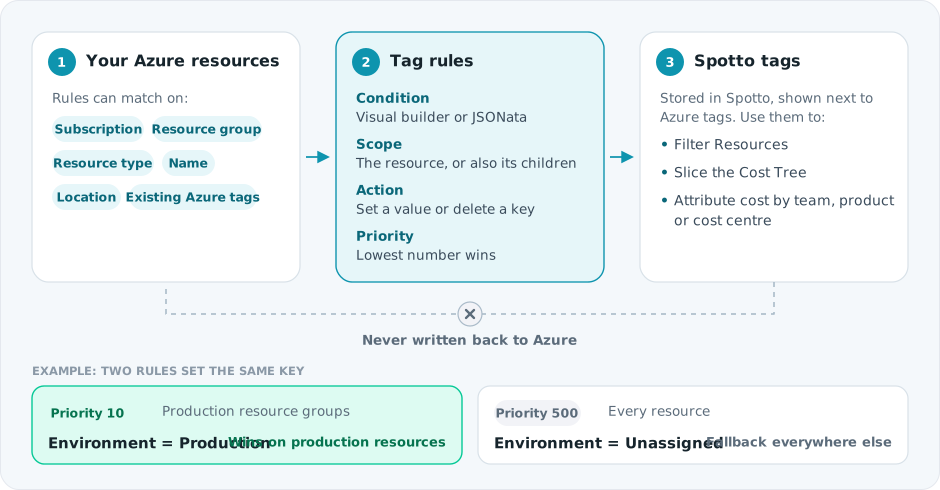
Spotto supports virtual tagging (Spotto tags): a read-only, provider-agnostic tagging layer maintained inside Spotto.
This lets you standardize cost attribution without relying on cloud-provider tag write permissions or risking conflicts with infrastructure-as-code.
Why Spotto tags exist
Teams usually want tags for cost attribution, ownership, and reporting - but provider-native tags often fall short in real operations.
Common pains
- Tag drift: IaC pipelines and automated deployments can overwrite or remove manual tags.
- Permission barriers: Many FinOps workflows run read-only; writing tags back requires elevated permissions and governance approvals.
- Inconsistent usage: Different teams use different keys/values (“prod”, “production”, “Prod”) and costs become hard to group reliably.
- Coverage gaps: Some resources aren’t tagged consistently (or at all), which breaks cost allocation and ownership reporting.
- Cross-boundary reality: Attribution needs to work across subscriptions/accounts (and eventually across multiple providers/tools), not just one Azure scope.
What you gain with Spotto tags
- A stable, internal source of truth for attribution: Tags used for analysis live in Spotto and don’t get overwritten by deployments.
- Read-only friendly: You can tag for reporting and allocation without changing anything in Azure.
- Faster analysis: Filter Resources and Cost Tree views by tags to slice spend the way the business thinks about it (product, team, env, cost center).
- Automation: Apply tags at scale with tag rules so new resources are classified consistently.
Turn tagging evidence into a governance decision
Select Business Value beside Notes on the Tags page. The brief uses the saved rule and strategy configuration to frame the taxonomy decision; configured rules do not by themselves prove resource coverage.
Generate tailors only the narrative for permitted users and saves it to the exact scope. Clear removes that saved narrative and immediately restores the standard Business Value content without deleting Customer Context or changing the saved tagging configuration. Regenerate when evidence changes. Above 100 subscriptions, the curated live brief remains available without tailoring.
Use it to approve a minimum tagging standard for:
- billing allocation and showback by product, service, cost centre, team, and owner
- ownership, environment, business criticality, and lifecycle or scheduling intent
- data-governance classification labels that help prioritize security and backup work
Store classification labels only—never sensitive content, credentials, or secrets. Spotto tags classify and group resources inside Spotto; they do not write Azure tags or automatically configure schedules.
The decision should name mandatory keys and allowed values, the taxonomy owner and exception authority, a coverage target, remediation ownership, and the review cadence. Delaying this work makes cost attribution, incident routing, change decisions, and policy evidence less reliable as the estate grows.
How Spotto tags differ from Azure tags
Spotto shows both sources side-by-side, but they serve different purposes:
| Capability | Azure tags | Spotto tags |
|---|---|---|
| Where they live | In Azure resource metadata | In Spotto (virtual metadata) |
| Writes back to provider | Yes (requires Azure permissions) | No (read-only to Azure) |
| Risk of IaC overwrite | High (if tags are managed by templates) | None (doesn’t touch IaC) |
| Primary use | Azure-native filtering/policy/automation | Reporting, filtering, and cost attribution |
| Works when tagging is restricted | Often no | Yes |
If you need tags for Azure-native features (policy, RBAC workflows, automation that runs in Azure), you should still use Azure tags. If you need tags for cost attribution and reporting in Spotto, Spotto tags are usually the better fit.
What you can do
- View tags on resources: Spotto displays both cloud-native tags (e.g., Azure tags) and Spotto virtual tags on each resource.
- Filter by tags: Use tag filters in the Resources and Cost Tree views to focus analysis on specific tag values.
- Automatically apply tags with rules: Create tag rules that apply tags to matching resources based on conditions.
Tag sources
Spotto commonly works with two tag sources:
- Cloud tags: Tags returned by the cloud provider (read-only in Spotto).
- Spotto tags: Virtual tags stored in Spotto (displayed alongside cloud tags).
In the UI, these are shown together so you can search and filter consistently.
Tag rules (Portal)
Tag rules are how you scale tagging across thousands of resources without manual work.
Tag rules let you define:
- Conditions: Which resources a rule applies to.
- Scope: Whether the rule applies to only a resource or also its descendants.
- Tags: The key/value pairs to set (or remove) when the rule matches.
- Priority: Lower numbers win when multiple rules conflict.
When to use rules (examples)
- Attribute by environment: Tag everything in production resource groups with
Environment: Production. - Attribute by ownership: Tag a platform team’s shared services by resource type and naming convention.
- Normalize inconsistent values: Apply a consistent canonical value (for example, standardize
Env: prodtoEnvironment: Production) for Spotto reporting.
Conditions: visual builder and JSONata
You can build conditions in two ways:
- Visual builder: Common conditions like “equals”, “contains”, “starts with”, and lists.
- Advanced JSONata: For complex match logic, you can edit the underlying expression.
Tag actions
When adding tags in a rule, you can:
- Set: Apply a static value for a key.
- Delete: Remove a key from matched resources.
Priority and conflicts
If multiple enabled rules set the same tag key on the same resource, Spotto resolves conflicts using priority:
- Lower priority numbers win.
- Use higher numbers for “fallback” rules.
Where to find it
In the Spotto Portal, tagging is managed under Settings -> Settings -> Tags:
- Navigate to your company in the Portal
- Open Tags to create, edit, and reorder tag rules
FAQ
Do Spotto tags change anything in Azure?
No. Spotto tags are virtual and stored inside Spotto. They are used for Spotto analysis, filtering, and cost attribution.
Can I still use Azure tags?
Yes. Spotto ingests and displays Azure tags as read-only reference data. You can filter and search using either Azure tags, Spotto tags, or both.
What should I tag first?
Start with the tags that unlock the most reporting value for your organization - common examples are Product, Environment, Owner, Team, and Cost Center.