Cloud Governance: Identity and Access Review
Overview
Governance supports Azure tenant and subscription reviews and AWS account reviews. Select a connected AWS account to review its Overview, Privileged access, Regulatory Compliance and Graph evidence. AWS collection covers root and IAM credential checks and account-level IAM policy assignments; collection gaps remain visible. See AWS account governance below for scope and limitations.
Azure Governance is a read-only review of how an Azure tenant is governed. It brings management groups, subscriptions, Azure Policy, RBAC, privileged and custom roles, exemptions, Global Administrator posture, findings, and their relationships into one page.
For the company compliance scoreboard, Defender and Policy control evidence, SDM report movement, recommended standards and scoped Azure Policy exemptions, see Azure Regulatory Compliance.
What Azure Governance checks
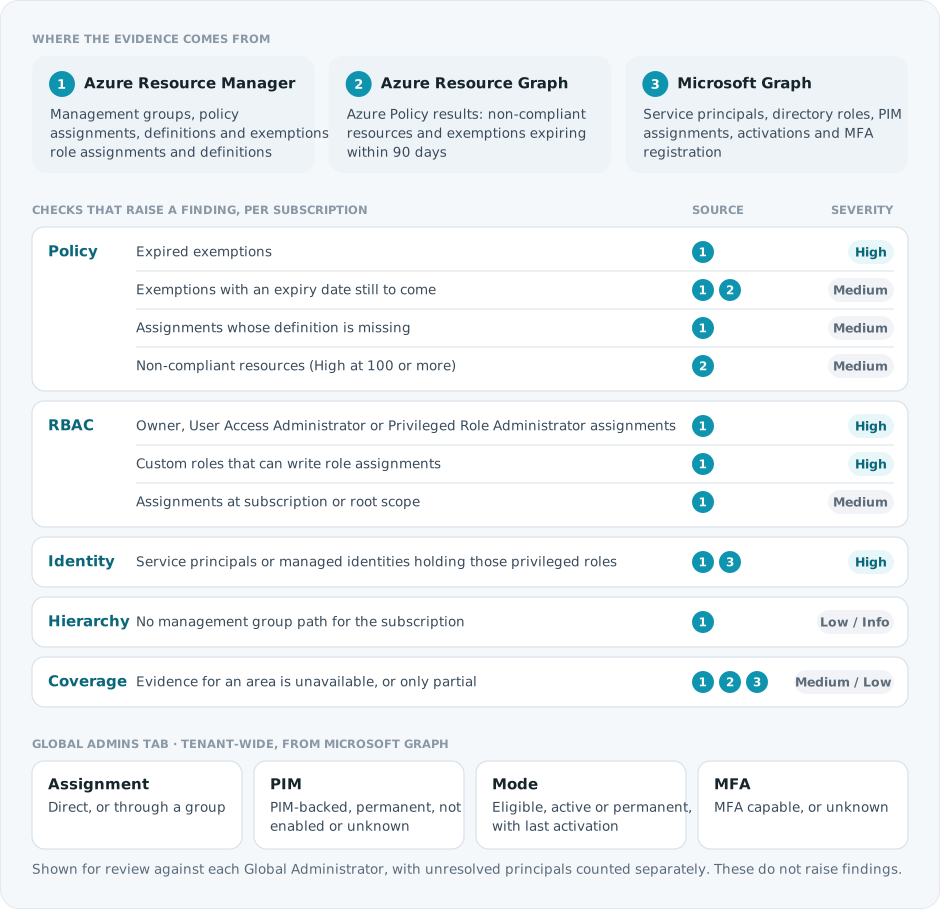
Each scan, Spotto reads three Azure sources and raises findings for each subscription. Global Administrator posture is shown on its own tab.
AWS account governance
For a connected AWS account, open Governance, select the account, and use Overview or Privileged access. The page uses the account's latest collected evidence. Users with account-management access can select Refresh account data to collect governance sources and other account data. Reports rebuild after collection when billing is ready. A views-only rebuild reuses stored evidence and does not refresh source observation times.
Overview shows root-account and IAM credential checks, including root MFA registration, active root access keys, console-password MFA, credential minimization and age/inactivity checks. The checklist results distinguish passed checks, findings needing attention, unassessed checks and checks that do not apply. Source coverage and freshness explain what the results can prove.
Privileged access shows IAM users and roles with detected administrator policy grants, including users who inherit policies through IAM groups. When Identity Center evidence is available, it also names workforce users and groups assigned administrator permission sets, including group members. Review the principal, target account, assigned role or policy, access path, confidence, restrictions and limitations. One principal can have several grants; the number of assignments is not the number of administrators.
Detection covers the AWS-managed AdministratorAccess policy and broad custom Allow statements granting all actions on all resources. This account-level delivery does not comprehensively classify narrower privileged permissions or privilege-escalation paths.
An administrator policy grant describes assigned permissions. It does not prove that the identity can perform every AWS operation: explicit denies, permissions boundaries, policy conditions, role trust and organization controls can limit access. The view does not make provider changes or perform a complete effective authorization calculation.
Coverage and MFA
Read collection coverage separately from freshness. A complete inventory can be stale, and a report generated recently can contain older source evidence. Rows omitted because of display bounds are counted explicitly. An empty or bounded list with incomplete coverage does not establish that no administrators exist.
MFA registration and MFA enforcement are separate observations. The IAM credential report can show a registered MFA device for an IAM or root identity; it cannot establish that MFA is enforced for every sign-in or that workforce identities have MFA through their identity provider. Unknown evidence stays unknown rather than becoming a failed check or a false value.
Centralized root management can remove usable member-account root credentials. That can make root MFA checks inapplicable. Spotto does not infer credential removal just because no password or active key appears in a credential report; a fresh organization configuration and exact-account credential audit must confirm removal before Spotto displays it. Missing audit flags remain unknown.
AWS sources and boundaries
Account governance needs the connection's read access to IAM authorization
metadata and credential reports. The relevant actions are
iam:GetAccountAuthorizationDetails, iam:GenerateCredentialReport and
iam:GetCredentialReport. If a source is denied, ask the AWS administrator to
review the connected role and applicable denies, then sync the account again.
Do not send credential values to Spotto. See
AWS cloud account setup.
Organization sources require an enabled management-account connection in the same company and estate, with the organization identity verified in AWS. Identity Center collection reads the account's provisioned permission sets, assignments and IdentityStore users/group memberships in its home Region. Organizations collection reads account/OU/root ancestry, delegated administrator accounts and attached service/resource control policy references. Policy attachments are evidence of possible restrictions, not a compliance verdict. Centralized root collection reads enabled organization features and audits credential presence using the member account's connection.
Denied reads remain Unavailable; bounded or incomplete collection remains Partial. A missing management connection or undiscovered Identity Center home Region remains Not collected with a reason. An IAM role used by Identity Center can appear even when workforce assignments cannot be resolved. Workforce MFA remains unknown after assignment collection.
For organization sources, the management role needs Organizations identity,
ancestry, delegated-administrator and policy-attachment reads; Identity Center
permission-set/assignment and IdentityStore identity/membership reads; and
iam:ListOrganizationsFeatures. The member role needs iam:GetAccountSummary
for its root audit. These collectors only read configuration and evidence.
Azure views continue to use their own hierarchy, Policy, RBAC and directory
evidence. The AWS views below use their native collected sources.
Native standards and recorded access graph
Regulatory Compliance shows collected Security Hub standards with passing, failing and not-assessed controls. Missing or disabled regional sources remain visible. No collected standard does not prove compliance, and passing controls do not certify the account. Viewing this evidence also requires Security access in Spotto. Spotto does not enable Security Hub automatically; review account requirements and service cost with the AWS administrator first.
Graph shows recorded subjects, assignments, roles, target scopes and access paths from the authorized access snapshot. It does not calculate effective permissions or infer Azure tenant relationships. Read its published timestamp, source coverage and omitted-chain count. The graph preserves whole displayed paths within its limits; the relationships table provides an accessible way to inspect the same evidence. Use zoom and pan on narrow screens, or select a node with the keyboard to inspect it.
An empty or incomplete graph does not establish that no access exists. If access permission is lost or the selected account changes, cached evidence is withheld until the current scope is authorized. Collection errors require source repair, not an inferred zero count. See AWS security setup.
AWS governance evidence is unavailable or incomplete
What you're seeing: The AWS view has no current report, an unassessed check, or a source marked unavailable, partial, stale or not collected.
Likely causes: The account has not completed a governance collection, an IAM read is denied, a collection bound was reached, or the source needs an registered organization management connection or the Identity Center home Region.
How to fix:
- Confirm the selected company and AWS account.
- Review the source's coverage reason and observation freshness.
- For IAM access failures, have the AWS administrator review the connected role's read permissions and denies, then run the account sync again.
- For missing organization sources, verify the enabled management account is connected in the same company and estate and its read permissions allow the required collection. Verify the Identity Center home Region if no instance was discovered.
- Run Refresh account data. If billing is not ready, source collection can finish while reports remain unchanged; complete billing setup before relying on a new report.
Why use this? (Jobs, pains, gains)
Jobs to be done
- When I review Azure governance posture, I want to see management groups, subscriptions, policy, RBAC, findings, and coverage together, so I can understand the implementation without stitching it together manually.
- When a subscription has risk, I want to drill into policy, exemptions, RBAC, privileged roles, and custom roles, so I can separate expected governance from drift or over-permissioned access.
- When a compliance or access question comes up, I want to trace scope and inheritance, so I can explain why a policy or role applies where it does.
- When governance relationships are unclear, I want a graph of policies, assignments, roles, principals, and hierarchy, so I can follow the chain instead of reading raw IDs.
Common pains
- Azure governance data is spread across Management Groups, Policy, IAM, Entra ID, subscriptions, and Resource Graph.
- Inheritance makes simple questions difficult: an assignment at a management group can explain behavior far below it.
- Empty tables can be misleading unless you know whether data coverage is complete, partial, unavailable, skipped, or unknown.
- Policy exemptions and custom roles are easy to miss, even though they often explain why governance differs from the expected baseline.
- Privileged RBAC assignments can hide in normal access lists unless they are surfaced as review items.
Turn the evidence into a decision
Select the labelled briefcase Business Value button beside Notes. The brief combines live findings, high/critical severity, policy or privileged-access metrics, and evidence coverage with a decision narrative.
The displayed facts remain live and missing evidence is called out. Generate tailors only the narrative for permitted users, saves it for the exact scope, and shows a freshness warning when evidence changes. Clear removes that saved narrative and immediately restores the standard Business Value content without deleting Customer Context or changing live facts. Above 100 subscriptions, the curated live brief remains available without tailoring.
Current position and priority work
Address critical and high-impact policy, privileged-access, and ownership gaps first. Restore incomplete evidence sources before treating the posture as complete, then define the standard control baseline and time-bound exception process.
Business outcomes
Governance turns cloud standards into repeatable delivery guardrails. Strong hierarchy, policy, and access ownership can make secure, compliant delivery easier rather than relying on manual review for every workload.
Cost of delay
Control drift can increase security exposure, audit effort, and the cost of correcting inconsistent environments. Broad privilege or unclear ownership can also make incidents harder to prevent, investigate, and contain.
Decision required
Approve the minimum control baseline, remediation owners, exception authority, and next compliance review date.
Validate with stakeholders
When you can manage Company Notes, select any question in the portal to retain the answer in the relevant Customer Context note.
- Which standards must apply everywhere, and where are exemptions legitimate?
- Who owns policy, privileged access, exceptions, and remediation at each scope?
- Which audits or platform changes make governance work time-sensitive?
Key capabilities
Review tenant governance posture
The Overview tab starts with tenant-level metrics for the selected cloud account: subscriptions, management groups, findings, high and critical findings, non-compliant resources, privileged assignments, policy assignments, and RBAC assignments. Breakdown cards show findings by severity, category, and subscription, so you can see whether risk is isolated or spread across the environment.
Check governance data coverage
The coverage panel shows whether each collection area is complete, partial, unavailable, skipped, or unknown. No RBAC rows with complete coverage means something different from no RBAC rows because RBAC collection is unavailable. The labels are text, not just color, so they stay readable in exports, screenshots, and assistive technology.
Review Global Administrator posture
Open Global Admins for tenant-level Global Administrator access. Summary cards count total principals, PIM-backed access, permanent assignments, and unresolved principals.
Review the collection coverage notice before treating an empty or incomplete result as clean. Missing Microsoft Graph role, eligibility, audit, user, group, or membership evidence limits the assessment.
Drill into subscriptions
Use Subscription Drill-Through or View Details in the subscription table to inspect one subscription:
- Findings by severity, category, and scope.
- Policy assignments, effects, compliance state, and scope.
- Policy exemptions, category, expiry, and scope.
- RBAC assignments, role, principal, scope, and inheritance.
- Privileged role assignments.
- Custom roles and assignable scopes.
- The management group path for the subscription.
Use it when an incident, failed deployment, sensitive action, or access review needs subscription-level evidence. Select Add to Kanban Board on a row to track it as work; see Tracked Recommendations.
Inspect policy and RBAC relationships
The Graph tab shows relationships for the selected tenant or subscription: containment, assignment scope, definition references, policy set membership, role grants, and principal links. Nodes can be tenants, management groups, subscriptions, policy assignments, definitions and set definitions, exemptions, role assignments, role definitions, and principals.
Use search and the node-type filter to isolate a policy, role, principal, or subscription. Selecting a node opens its details; on a subscription node, Open Subscription Detail jumps back to the subscription review.
Investigate findings that need attention
Findings, high and critical findings, non-compliant resources, and privileged assignments are treated as attention metrics when their count is above zero. Start with high findings, then check whether they are tied to a specific subscription, management group path, policy assignment, or privileged role.
Where to find it
In the Spotto Portal, go to Security -> Posture -> Governance.
Governance keeps the selected cloud account, subscription drill-through, and active view while you stay on the page. Leaving the page clears those query parameters so other pages do not inherit a stale scope.
Recommended workflow
- Select the company and Azure cloud account you want to review.
- Check the tenant metrics for findings, high and critical findings, non-compliant resources, and privileged assignments.
- Review coverage before trusting an empty table.
- Open Tenant Governance Data and scan the Subscriptions, Findings, Policy, and RBAC tabs.
- Use View Details on a subscription with elevated risk or incomplete coverage.
- Review subscription findings, policy exemptions, RBAC inheritance, privileged assignments, and custom roles.
- Open Global Admins to check permanent, unresolved, direct, and group-derived tenant administrators.
- Switch to Graph when you need to understand inheritance or relationships between policies, assignments, roles, and principals.
Technical reference
| Component | Details |
|---|---|
| Primary scope | Selected company and Azure cloud account. |
| Optional drill-through | Selected Azure subscription. |
| Graph filters | Text search, node-type filter, reset action, minimap, and graph controls. |
| Visible errors | Separate error states for tenant report, subscription report, and graph data. |
How it differs from Azure-native views
The Azure portal is where you change policy assignments, exemptions, RBAC, roles, or management group structure. Spotto Governance does not change them; it brings the evidence from Management Groups, Policy, IAM, Entra ID, and Resource Graph together so you can review posture, troubleshoot changes, and decide what needs follow-up.
Troubleshooting
Governance report could not be loaded
What you're seeing: The page shows Governance report could not be loaded.
Likely causes:
- The tenant governance collection has not completed yet.
- The selected cloud account is unavailable.
- Spotto could not retrieve the governance report for that scope.
How to fix:
- Refresh the page and try again.
- Confirm the selected cloud account is the account you expected.
- If the issue persists, wait for the Azure tenant governance collection to complete and retry.
No governance report data found
What you're seeing: The page shows No governance report data found.
Likely causes:
- The selected cloud account has not returned tenant governance data yet.
- Governance collection completed without report data for that account.
How to fix:
- Check whether another cloud account has governance data.
- Confirm the Azure account still has subscriptions connected to Spotto.
- Retry after the next collection run.
Subscription governance could not be loaded
What you're seeing: The subscription section shows Subscription governance could not be loaded.
Likely causes:
- The selected subscription report is unavailable.
- The subscription was removed, renamed, or is no longer accessible.
- The report is still processing.
How to fix:
- Select another subscription and confirm tenant data loads.
- Return to the original subscription and retry.
- Refresh the page if the subscription was recently added or changed.
Governance graph could not be loaded
What you're seeing: The Graph tab shows Governance graph could not be loaded.
Likely causes:
- The graph artifact is still processing for the selected scope.
- Graph data is unavailable for the selected tenant or subscription.
How to fix:
- Refresh the page and retry the Graph tab.
- Switch between tenant and subscription scope to see whether one graph is available.
- Use the Overview tables while the graph artifact finishes processing.
No matching graph nodes
What you're seeing: The Graph tab shows No matching graph nodes.
Likely causes:
- Search text is too specific.
- The selected node type filter excludes matching nodes.
How to fix:
- Clear the search box.
- Set the node-type filter back to All node types.
- Use Reset to return the graph to its default view.
Looking to enhance your cloud setup for cost efficiency, performance, reliability, or security?
Talk to a cloud specialist. Email us or schedule a 30-minute consultation and let's optimize your cloud environment together.
Book a Free Consultation