Commitments Planning: RI and Savings Plans
Overview
Individual utilization readings and a weighted portfolio average are different evidence. A selection can have readings for every reservation while its portfolio average remains unavailable because the producer's hour and quantity weights cannot be combined. AWS organization billing summaries retain their own periods and methods.
Commitment price currency is also distinct from annual cost currency. The observed inventory shows known annual-cost currency and basis separately; billed evidence and retail estimates are not combined, and missing currency or cost still prevents a complete portfolio total. Native purchase quotes retain their reported currency, which may differ from the company's pricing currency.
Commitments Planning is the working area for Reserved Instances (RI) and Savings Plans (SP). It brings utilization, coverage, renewal timing, cashflow exposure and purchase recommendations into one page, so you can see what is expiring, what is wasted, and where a commitment would still save money.
In the Spotto Portal, open your company and go to Investigate -> Cost -> Commitments. The page shows one Azure cloud account, exact AWS account, or AWS organization at a time.
Utilization and coverage
Two numbers answer different questions. Utilization asks whether you use what you paid for. Coverage asks whether your eligible usage is paid for at the committed rate.
For AWS, review qualified compute and Database Savings Plans as separate families. Native account Savings Plans coverage uses On-Demand equivalent usage cost; Reserved Instance coverage uses instance hours. These source metrics do not establish billed or amortized commitment charges. The percentages are not averaged. An individual family figure can remain available while an overall value is unavailable because another benefit population is missing, stale or unsupported.
Account coverage describes consumed benefits, including shared commitments. It does not establish account ownership or renewal dates for payer-owned purchases. Older unfiltered analytics need refreshed, qualified source evidence before they can be presented as a compute or Database family measurement. Ask your administrator to review source coverage and the current AWS read policies rather than treating a missing number as zero.
Native AWS coverage amounts are On-Demand equivalent costs reported in Cost Explorer's USD currency, separate from billed allocation. Savings Plans covered, eligible and uncovered amounts appear only with verified account, currency and reporting-period evidence. Reserved Instance coverage can show uncovered cost while covered and eligible amounts remain unavailable: purchasing-account utilization does not identify which shared reservations covered this account's usage. Cards and CSV exports keep those family figures separate and preserve missing values.
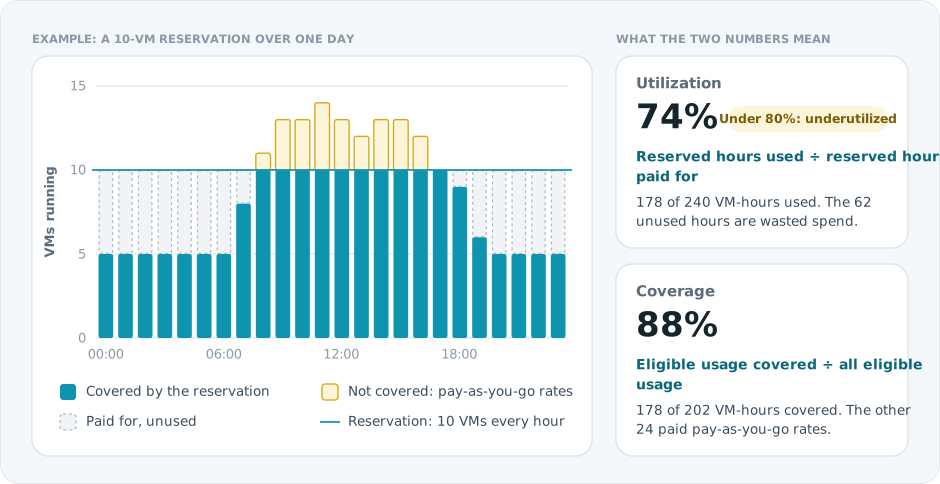
How Spotto calculates them:
- Azure reservation utilization comes from Azure's daily reservation summaries (used hours ÷ reserved hours) over the last 1, 7 and 30 days. The portal treats a commitment as underutilized when its 30-day utilization (or 7-day, if 30-day isn't available) is below 80%.
- Coverage is covered usage ÷ eligible usage. Spotto works it out per resource from billing records, and per commitment family (for example compute reservations) from covered and eligible cost.
- Observed covered cost in billed allocation is the amortized cost of usage that commitments covered in the period. Native AWS coverage amounts use separately labelled On-Demand equivalent cost and require their own currency and period evidence.
High utilization only means reserved hours were used by matching resources. A VM that runs all day at 5% CPU still uses 100% of its reserved hours, so check rightsizing recommendations before you renew.
What to do about each state
The diagram below describes Azure commitment review and quote workflows. AWS organization refresh is a read-only evidence collection workflow.
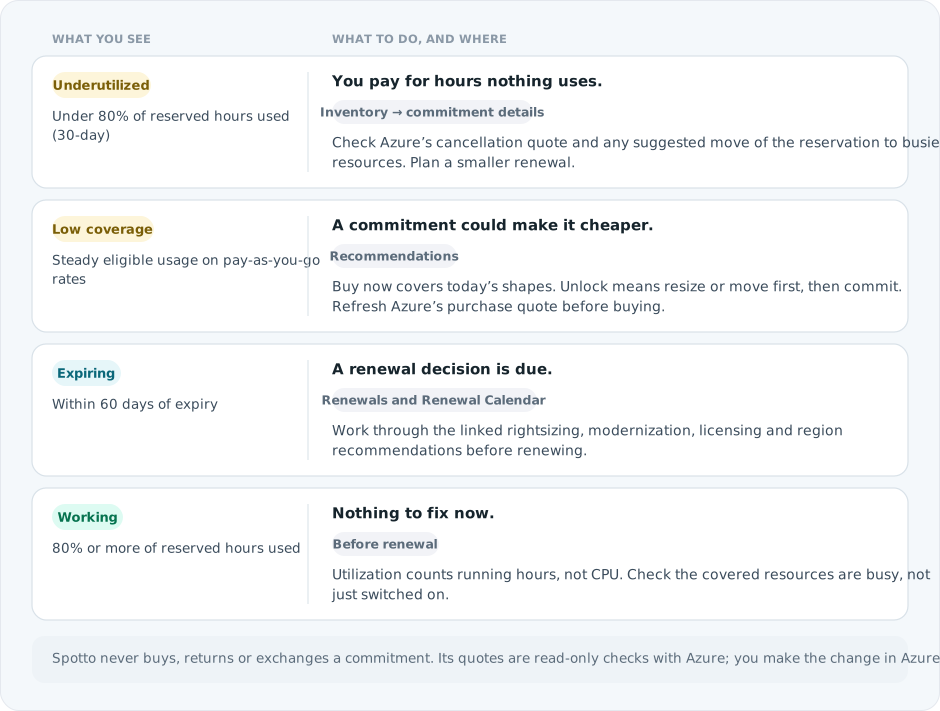
Turn the evidence into a decision
Select the labelled briefcase Business Value button beside Notes. The brief combines live inventory, utilization, modelled opportunity, currency/coverage quality, and renewal facts with a priority body of work.
Financial opportunity remains labelled as modelled; partial evidence and mixed currencies are not presented as one total. Generate tailors only the narrative for permitted users and saves it to the exact scope. Clear removes that saved narrative and immediately restores the standard Business Value content without deleting Customer Context or changing live facts. Regenerate when evidence changes. Above 100 subscriptions, the curated live brief remains available without tailoring.
Current position and priority work
Validate stable uncovered demand before approving purchase opportunities. Review underutilized and expiring commitments before renewal dates remove flexibility, and separate opportunities that first need usage optimization or stakeholder confirmation.
Business outcomes
Commitments convert predictable cloud demand into savings. The value is not the discount alone: it is making a risk-adjusted investment that preserves enough flexibility for migrations, growth, retirement, and architecture change.
Cost of delay
Stable uncovered demand can leave material savings unrealized. Conversely, underused or automatically renewed commitments can lock budget into capacity the customer no longer needs.
Decision required
Approve which actions to take now, which assumptions must be validated, and who owns renewal and utilization review.
Validate with stakeholders
When you can manage Company Notes, select any question in the portal to retain the answer in the relevant Customer Context note.
- Which workloads are stable enough to support a one- or three-year decision?
- What migrations, retirements, growth, or architecture changes are planned?
- How much flexibility are stakeholders willing to exchange for savings?
The page, tab by tab
Summary
The cards above the tabs show 7-Day Utilization, 30-Day Utilization, Observed Covered Cost, Buy Now Annual Savings (direct buy recommendations for current eligible shapes) and Unlock Annual Savings (net benefit after resizing or moving first, then committing).
Choose an account or organization scope
Commitments Planning keeps each provider scope distinct. Select the scope that matches the decision you are reviewing:
| Scope | What it shows | How it refreshes |
|---|---|---|
| Cloud account | Commitment evidence published for one Azure cloud account or one exact AWS account. An AWS account remains a linked-account view; it is not an organization total. | Uses the normal cloud-account processing path. |
| AWS organization | One stored portfolio for a configured AWS organization. It keeps member-account commitment ownership separate from management/payer Cost Explorer evidence. | Start Refresh organization commitments from an organization member's AWS account status/details. Commitments Planning remains read-only. |
The AWS organization option appears only for a persisted, enabled organization that Spotto can view. A standalone AWS account remains available through cloud-account scope.
Refresh AWS organization commitments from account details
- Open Connectors -> Cloud Accounts for the company.
- Open the status/details experience for any current account in the configured AWS organization.
- In Organization commitments, select Refresh organization commitments before the separate Sync AWS account action.
Every current member-account details screen is an entry point to the same organization workflow. The action refreshes the configured organization, not only the account whose details you opened. Its organization name, management account, member count, and action copy make that scope explicit.
The request runs asynchronously and is separate from full AWS estate reconciliation. It does not reconfigure cloud accounts, rerun the whole estate setup, discover AWS accounts or organizational units, or start a general resource sync. Commitments Planning does not start or poll this operation; it reads the last published organization portfolio.
Spotto resolves the organization membership, management/payer identity, and current configuration on the server. The browser does not supply or override them. If a refresh is already active, Spotto follows that single in-progress run instead of starting overlapping work.
Workflow state and published-artifact freshness are separate:
| Workflow state | Meaning |
|---|---|
not-started | No organization commitments refresh has started for the current configuration. |
pending | Spotto accepted the request and queued the organization work. |
processing | Payer evidence, account inventory, portfolio processing, or publication is in progress. |
fresh | The run completed and published current evidence for the supported sources. Deliberately unavailable allocation remains unavailable. |
partial | The run published usable evidence, but one or more payer, member-account, or processing inputs were incomplete. Missing evidence is not treated as zero. |
failed | The run could not publish a usable result for that attempt. A previously published artifact can remain visible. |
The latest artifact is reported independently as available, stale, or unavailable. stale means Spotto can still show an older last-good artifact; unavailable means there is no usable published organization artifact. An active or failed refresh does not erase last-good data.
Dashboard
Charts of when RIs come up for renewal and what they cost, the RI renewal schedule, renewal months that include underutilized RIs, and Savings Plan run rate and coverage. Savings Plan cards only appear for values Spotto has evidence for.
Inventory
One row per active commitment, grouped by Reserved instance and Savings plan: scope, status, expiry, 30-day utilization, size, coverage, covered cost and linked resources. Other views list all covered resources and summarize by region and SKU. Open a row for its details, including the Check Cancellation Quote card for reservations (Azure's read-only refund quote: refund amount, cancellation fee and net cancellation cost) and any suggested reservation moves.
Renewals
A review queue of commitments within 60 days of expiry (and recently expired ones). It opens with one renewal decision at a time. The decision card shows expiry timing, retail estimate, the annual cost increase if you don't renew, linked recommendations to work through first, and every affected resource available in the current evidence. Use Previous and Next, the left and right arrow keys while a decision navigation control has focus, or the queue beside the card to move between decisions. Select Show All Renewals for the searchable, filterable table, then Focus on one decision to return to the focused view.
Linked recommendations can be labelled Rightsizing before renewal, Modernization before renewal, Licensing before renewal or Location or scope change. A decision with No recommendations is a straightforward renewal. For Azure, the queue isn't limited to compute reservations; it can include SQL reserved capacity and other supported commitment families. The AWS view covers the qualified commitment families present in its published artifact. If resource attribution is incomplete, the card only lists resources supported by the available evidence.
Renewal Calendar
Upcoming renewals for the next 12 months grouped by month, so you can see where renewal cost concentrates. Cards show expiry date, renewal cost, utilization and coverage, recommendation count and planning hints such as renewing now, delaying, staging smaller purchases or changing the billing plan. For supported Azure reservations, when no renewal quote was collected, the card shows Not collected and offers Refresh quote.
AWS organization refresh does not request a purchase or renewal quote.
Recommendations
Spotto Recommendations opens with one purchase opportunity at a time. Its card shows expected annual savings or net annual cost increase, pricing basis (Customer quote when Spotto has collected one, otherwise an Azure estimate), and all affected resources available in the current evidence. Open Review opportunity details for the proposed purchase, quote status and annual resource cost. Use Previous, Next or the queue to move between opportunities. Show All Opportunities opens the searchable, filterable table; Focus on one decision returns to the focused view. Resource attribution is labelled unavailable when Spotto has no resource-level evidence for an opportunity.
Azure Recommendations compares term scenarios with projected net savings; these are options, not realized savings. When no scenario data exists, the view says so rather than inventing a comparison.
AWS organization recommendations are payer-scoped planning evidence; refreshing them does not add anything to an AWS cart or purchase a commitment.
From a resource
On supported Azure Cloud Resources details, a Reserved Instance or Savings button appears when the resource is covered by a commitment. It opens Commitments in that resource's context.
Azure Hybrid Benefit is separate
Hybrid Benefit and commitments reduce different parts of the bill. Review Windows Server and SQL licensing in Azure Hybrid Benefit. Spotto doesn't add the two savings together.
Savings Plan recommendations
Savings Plans are hourly spend commitments. They are not reservation SKU or quantity quotes. When Spotto shows a Savings Plan recommendation, review:
- Hourly Commitment - the proposed commitment amount per hour and currency.
- Annualized Commitment - the hourly commitment projected over a year.
- Scope - whether the recommendation is scoped to shared, subscription, or resource-group usage.
- Lookback - the usage window used for the recommendation.
- Coverage and utilization - how much eligible usage the commitment is expected to cover and how fully the commitment is expected to be used.
- Wastage and overage - estimated unused commitment and usage that remains on pay-as-you-go rates.
- Price basis - whether the values come from negotiated customer pricing, retail fallback pricing, mixed evidence, or unknown pricing.
- Confidence and reasoning - the evidence supporting the recommendation and any uncertainty.
Azure can expose Savings Plan recommendations through Azure Advisor, the Azure portal purchase experience, and the Benefit Recommendations API. The surfaces do not have identical scope and lookback behavior:
| Surface | Scope and lookback notes |
|---|---|
| Azure Advisor | Subscription-scope recommendations with a 30-day lookback. |
| Azure portal purchase experience | Shared, subscription, and resource-group recommendations with a 30-day lookback. |
| Benefit Recommendations API | Shared, subscription, and resource-group recommendations with 7-, 30-, and 60-day lookbacks. |
Spotto labels missing recommendation fields as unavailable instead of showing a zero when the source did not provide enough evidence.
Azure recommendation savings and scenario costs describe the selected observation window. Spotto preserves those provider values and only shows an annual or term projection when the response includes a usable totalHours denominator. The projection assumes the observed hourly economics continue for the modeled horizon; it is not a provider-reported annual total or realized savings guarantee. Azure's total scenario cost after a reservation is not presented as the reservation purchase price.
Savings Plan utilization uses provider utilization when available or amortized used-versus-unused commitment cost. Zero-cost ActualCost rows can identify covered resources, but they do not prove paid commitment utilization. Coverage percentages include only verified eligible cost; ineligible and unknown-attribution amounts are shown as data-quality context outside the denominator. Current coverage and proposed what-if coverage are separate scenarios.
Buying a Savings Plan
Spotto shows the recommended hourly commitment, term, affected resources, and available planning evidence. Review the opportunity with your team, then have someone with purchase rights confirm the current price and terms in Azure before buying. Spotto does not submit a purchase request or execute an Azure Savings Plan purchase from this page.
Microsoft reference:
- Savings plan recommendations
- Choose a savings plan commitment amount
- Benefit Recommendations API
- View savings plan utilization after purchase
- View savings plan cost and usage details
- Download your savings plan price sheet
Technical reference
| Component | Details |
|---|---|
| Inputs | Provider commitment inventory, billing coverage and utilization, recommendation artifacts, renewal timing, and quote or pricing-estimate data when available. AWS organization scope keeps member-owned inventory and management/payer evidence distinct. |
| Outputs | Dashboard cards, inventory rows, renewal queue rows, monthly renewal calendar groupings, recommendation models, optional term strategy scenarios, and AWS organization refresh evidence. |
| Defaults | Utilization focuses on 7-day and 30-day windows. Renewal views prioritize upcoming expiries and show recommendation context only when the current artifact includes it. Savings Plan recommendation filters support the lookback and term evidence available in the current artifact. AWS organization refresh uses configured membership and never discovers accounts. |
How it differs from other Spotto pages
Commitments Planning is different from the standard Recommendations and Cloud Resources pages:
- It is organised around commitment decisions, not just resources.
- It combines expiry timing, renewal review, and purchase planning in one workflow.
- It can show quote-specific pricing context, which may differ from generic estimated savings views.
- It keeps renewal review and recommendation review together so you can see the cost of renewing before you decide whether to modernize first.
How it works
Spotto builds the page from stored commitment, billing, recommendation, and quote inputs collected for the selected provider scope. Some sections can appear or disappear depending on which evidence that scope contains.
- Inventory can be present before any renewal falls inside the review window.
- Recommendation pricing uses a Customer quote when Spotto has collected one, or an Azure pricing estimate when it has not. Purchase quotes come from Azure's price calculation and refund quotes from Azure's refund calculation; neither changes the commitment.
- Monetary totals are hidden rather than combined when subscriptions use different currencies.
- Renewal rows can exist with 0 recommendations if the current renewal does not need extra investigation.
- Savings Plan recommendation pricing can use Negotiated price when customer price evidence is available, Retail price when only retail fallback evidence is available, Mixed price when evidence comes from multiple bases, or Unknown price when no reliable basis was collected.
- Azure Renewal Calendar cards can offer quote refresh actions if pricing was not collected during the earlier processing cycle.
- An AWS organization view reads one published organization artifact. The Portal does not construct organization totals by adding member-account pages together.
AWS can apply Reserved Instance and Savings Plans discounts across eligible accounts when sharing is enabled. Spotto's organization view keeps account ownership and payer aggregate evidence separate, but it does not prove which member account received each discount. Treat benefit allocation and resource attribution as unavailable unless the page explicitly shows evidence for them. Do not use this view as a chargeback ledger or sum account views to infer an organization allocation.
Payer coverage, utilization, and recommendations describe the full consolidated AWS organization. They can include accounts that are not configured for member inventory in Spotto; the configured account list controls inventory collection, not the scope of AWS payer aggregates.
For final billed allocation, use the customer's authoritative AWS billing records and allocation process. See AWS guidance for Reserved Instance and Savings Plans discount sharing.
Why commitment data can be missing
Available inventory and expiry evidence remain visible when another selected subscription or account fails to load. Complete financial totals and exports stay unavailable when the selected portfolio is incomplete or spans currencies. The count of commitments with observed utilization is separate from a weighted portfolio utilization average; collected row values do not prove an aggregate average.
Explicit Azure subscription selections stay in scope until you deliberately choose the whole connection. For AWS member accounts without commitment inventory, check the configured organization scope. Organization payer utilization and coverage are shown separately with their billing window and basis, and are not per-resource allocation. Native payment details distinguish upfront amounts, recurring charges and hourly Savings Plan commitments.
When Commitments shows no RI/SP data or reservation quote actions are unavailable, the common causes are:
- There are no active Reserved Instances or Savings Plans in scope.
- The Spotto cloud account is missing the provider-scope permissions for commitment data or quotes.
Use the provider-specific Cloud Account guide for onboarding and permission setup:
For Azure, confirm Reservations Reader and Reservations Contributor are assigned at /providers/Microsoft.Capacity, and Savings plan Reader at /providers/Microsoft.BillingBenefits. Reservations Reader is needed to discover reservation orders and details; Reservations Contributor is needed so Spotto can calculate and refresh reservation quotes. See Azure Cloud Account Setup.
Savings Plan recommendations and utilization also depend on Cost Management billing access for the relevant subscription or billing scope. If shared-scope recommendations are expected, the billing scope must be visible to the Spotto cloud account; otherwise, Spotto can only show the lower-scope evidence it can read.
Microsoft notes that initial Savings Plan utilization can take up to 48 hours to appear after purchase, and later usage data can still lag by several hours. Recent purchase timing also matters: recommendation systems need time to reflect new reservations or Savings Plans, and Microsoft recommends waiting at least 7 days before buying the other commitment type for the same eligible usage.
For an AWS organization, the management/payer role needs the Cost Explorer permissions used for organization coverage, utilization, and recommendations. Enabled member roles need Savings Plans and regional EC2 Reserved Instance inventory reads. Use Spotto's current generated customer instructions; do not copy an older role policy or grant broad AWS Organizations access as a workaround.
Troubleshooting
The page shows "No Reserved Instance or Savings Plan data yet"
What you're seeing: Commitments renders an empty-state card with a mascot and no inventory rows.
Likely causes:
- No active RI/SP commitments in the selected subscriptions.
- Missing Reservations Reader, Reservations Contributor, or Savings plan Reader at the required provider scopes.
- The selected AWS organization has no usable published artifact yet, or its payer/member evidence is unavailable.
How to fix:
- Confirm the selected cloud account or AWS organization includes accounts with active commitments.
- For Azure, review Azure cloud-account permissions. For AWS, review AWS cloud-account setup.
- For Azure, re-run sync and refresh after RBAC propagation. For an AWS organization, open any current member account's status/details and run Refresh organization commitments once. Wait for processing, then return to the read-only Commitments page after permission changes propagate.
If Spotto says organization commitments collection is not enabled, review the organization's management account setup in Spotto. Its commitments collection purpose must be enabled before a refresh can start. This setup message does not prove that the AWS role is missing IAM permissions. Account inventory may already be present while the separate organization portfolio awaits its first refresh.
AWS organization refresh is partial
What you're seeing: The organization refresh finishes as partial, or the page shows a stale last-good artifact.
Likely causes:
- One or more member-account inventory reads did not complete.
- Management/payer Cost Explorer evidence or recommendation generation was unavailable.
- Spotto retained older usable evidence while the latest source attempt failed.
How to fix:
- Review the payer and member-account progress in AWS account status/details instead of treating missing values as zero.
- Confirm the current generated AWS role instructions have been applied to the affected roles.
- Use AWS Cloud Account Troubleshooting for detailed status and recovery guidance.
Utilization shows N/A
What you're seeing: Utilization cards or rows show N/A and low/zero "with utilization data" counts.
Likely causes:
- Utilization data has not been populated for the selected window yet.
- Sync is recent or still in progress.
For AWS Savings Plans, coverage can be available even when AWS reports utilization data as unavailable. Spotto keeps that coverage and leaves utilization missing; it does not treat missing utilization as zero.
How to fix:
- Check the cloud account sync status in the Portal.
- Wait for the next sync cycle and refresh.
- Confirm you are filtering to subscriptions that have active commitments.
A renewal shows "No linked recommendations"
What you're seeing: A renewal row appears, but the recommendation count is 0 and the row says No linked recommendations.
Likely cause: Spotto found the renewal, but there are no modernization or optimization actions attached to that renewal in the current data set.
How to use it:
- Treat the row as a simpler renewal review rather than a missing-data problem.
- Open the renewal details if you still want to confirm linked resources before renewing.
- Re-check after the next processing cycle if you expect recommendation data to be added later.
The Renewal Calendar shows "Not collected" for quote cost
What you're seeing: A renewal card has no collected quote value yet.
Likely cause: The renewal quote was not available during the earlier processing cycle.
How to fix:
- Use the quote refresh action from the calendar card if it is available.
- Wait for the quote workflow to complete.
- Refresh the page to check for an updated quoted value.
The Recommendations tab has fewer rows than expected
What you're seeing: Commitments inventory and renewals are present, but the Recommendations tab is sparse or empty.
Likely causes:
- The current subscriptions do not have commitment purchase opportunities in the latest artifact.
- Quote or recommendation inputs are still processing.
- Filters or subscription scope are excluding the affected workloads.
How to fix:
- Clear filters and confirm the right subscription scope is selected.
- Re-check after the next processing cycle.
- Compare against renewal rows to see whether the work is showing up as a renewal review rather than a new purchase recommendation.
A Savings Plan recommendation is incomplete
What you're seeing: A Savings Plan opportunity is visible, but some commitment details or planning evidence are missing. Likely causes:
- Azure did not provide a term, hourly commitment, currency, observation hours, or a usable price basis for the recommendation.
- Recommendation evidence is incomplete, has low confidence, or is affected by recent or overlapping RI and Savings Plan activity.
- The recommendation scope is not enabled by company policy, or billing scope cannot be verified.
How to fix:
- Review any blocker shown with the opportunity.
- Confirm Cost Management and Savings Plan permissions are assigned for the relevant scope.
- Re-run sync after permissions or billing-scope access changes, then verify the current price and terms in Azure before buying.
Savings Plan values look stale after a recent purchase
What you're seeing: Savings Plan recommendations or utilization do not immediately reflect a recent Savings Plan or reservation purchase. Likely cause: Azure recommendation and utilization systems update on a delay. Advisor and portal recommendations can take several days to reflect recent purchases, and recommendation updates for other scopes can take longer. How to use it:
- Avoid using Spotto or Azure recommendations to buy overlapping reservations and Savings Plans for the same usage immediately after a purchase.
- Wait for the next sync after Azure has refreshed utilization and recommendation data.
- Treat recommendation rows with stale or missing evidence as review inputs, not purchase instructions.
Azure Recommendations has no scenarios
What you're seeing: Recommendations -> Azure Recommendations has no term scenarios.
Likely cause: No Azure recommendation scenarios are available for the current subscriptions and filters.
How to fix:
- Clear the Azure Recommendations filters and review again.
- Validate recommendation inputs are syncing for those subscriptions.
- Re-check after the next processing cycle.
Looking to enhance your cloud setup for cost efficiency, performance, reliability, or security?
Talk to a cloud specialist. Email us or schedule a 30-minute consultation and let's optimize your cloud environment together.
Book a Free Consultation