Azure Hybrid Benefit: Licence Cost and Payback
Overview
Azure Hybrid Benefit in Spotto shows where the benefit is enabled and where Windows Server or SQL Server resources may justify a closer licensing review. It compares the identifiable Azure pay-as-you-go (PAYG) licence charge with the cost of buying licences for a full term, then shows payback and the work needed to apply and maintain the benefit.
It is a cost-optimization view, not a software asset management or compliance system. Spotto reads Azure configuration and billing, but Azure data can't prove that your organization owns the qualifying licence rights.
In the Spotto Portal, open a company and go to Investigate -> Cost -> Hybrid Benefit. The page title is Azure Hybrid Benefit. It supports multiple subscriptions and keeps totals separate by currency.
Windows Server licences and where the saving comes from
Azure Hybrid Benefit for Windows Server is counted in core licences. Standard and Datacenter licences both count; Microsoft's Hybrid Benefit guidance separates them on whether they can stay in use on-premises at the same time.
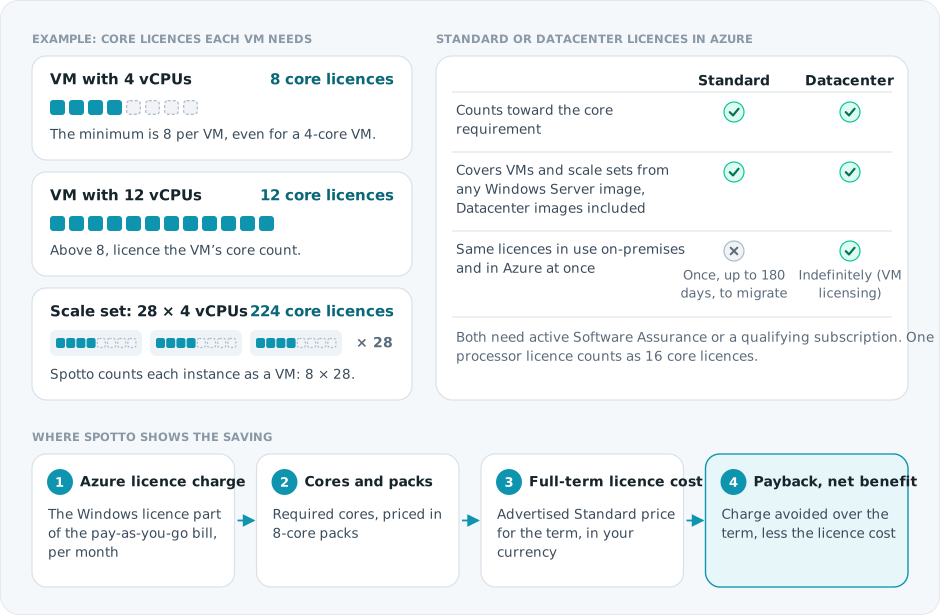
Sources: Explore Azure Hybrid Benefit for Windows VMs and Azure Hybrid Benefit for Windows Server.
- Spotto can't see which edition of licence you own or need. It prices Windows Server Standard for every Windows VM and scale set, because Standard licences can cover a VM running a Datacenter image.
- Datacenter can still be the right purchase when the same licences must keep covering on-premises servers after the move. Storage Spaces Direct, Network Controller and Host Guardian Hyper-V Support are Datacenter-only features; if a VM uses them, or runs its own Hyper-V VMs or Hyper-V-isolated containers, confirm the edition with your licensing provider.
- Workloads using the benefit can only run on it during the Software Assurance or subscription term.
Turn the evidence into a decision
Select the labelled briefcase Business Value button beside FinOps Notes and the subscription selector. The brief combines live opportunity, applied-configuration, review, gross charge-avoidance, and payback evidence. Applied configuration does not by itself prove entitlement.
Live facts retain their estimate and currency boundaries. Generate tailors only the narrative for permitted users and saves it to the exact scope. Clear removes that saved narrative and immediately restores the standard Business Value content without deleting Customer Context or changing live facts. Regenerate when evidence changes. Above 100 subscriptions, the curated live brief remains available without tailoring.
Current position and priority work
Validate existing qualifying rights for technically eligible workloads before changing Azure configuration. Resolve missing pricing or eligibility evidence, obtain supplier quotes where needed, and prioritize only opportunities with supportable net value and payback.
Business outcomes
Azure Hybrid Benefit can reduce eligible Windows and SQL compute costs when qualifying rights are available. The value comes from joining technical opportunity, licensing investment, allocation, and compliance ownership into one reviewable decision.
Cost of delay
Eligible workloads may continue paying licence-inclusive Azure rates while qualifying rights remain unused or unverified. Applying the benefit without confirmed entitlements, core counts, mobility rights, or tracking can instead create licensing exposure and weaken audit evidence.
Decision required
Confirm entitlement ownership, approve the evidenced opportunities to implement, and assign ongoing allocation and compliance review.
Validate with stakeholders
When you can manage Company Notes, select Comment beside any question in the portal to retain the answer in the FinOps Customer Context note.
- Which qualifying Windows Server or SQL Server licences and Software Assurance or subscription rights are available and unallocated?
- Which workload, migration, scaling, or commitment changes could alter required core counts or benefit eligibility?
- Who owns entitlement validation, allocation records, renewal dates, and periodic compliance review?
Review the page
Decision summary
For each currency, the summary shows the Azure License Charge per month and per year (a gross opportunity, not net savings), how many Resources Worth Investigating have a positive charge, and, when Spotto has a usable price and exchange rate:
- Full-Term License Cost: the converted advertised price for all required licence packs over the committed term.
- Monthly Cost Equivalent: the full-term cost divided by the committed months. It is a comparison value; the licence is still a term commitment.
- Estimated Payback: how long the charge must continue before it equals the licence cost, or Review by Resource when payback differs across resources.
- Modelled Net Benefit Over Term (or Net Cost): the charge avoided over the term less the full-term licence cost. Explain this result shows why a result is a net cost.
When the price, exchange rate or resource shape is missing, Purchase Economics says the estimate is unavailable. When an amount can't be calculated safely, Spotto shows a dash, not $0.
Amounts are estimates. Spotto uses a public CSP guide price and recorded currency conversion; your agreement, final quote, taxes, entitlement, allocation, billing cadence and cancellation terms decide the real result.
What each resource shows
Resource details show each step of the calculation: the observed or matched PAYG licence charge; resource cores, the licensing minimum, normalized cores where they apply, pack size and required packs; the source product, currency, per-pack term price and effective date; the FX rate, source and date; and payback and runtime outcomes. An advertised offer marked Unverified is a conditional estimate: useful for deciding whether a real quote is worth getting, but not proof that the offer includes qualifying Azure Hybrid Benefit rights.
Worked example
This simplified example uses rounded illustrative values rather than a customer quote:
| Input or result | Value |
|---|---|
| Azure PAYG licence charge | NZD 100/month |
| Advertised licence rate | USD 275 per 8-core pack for one year |
| Currency conversion | 1 USD = 1.77 NZD |
| Required licence packs | 1 |
| Full one-year investment | NZD 486.75 |
| Monthly equivalent | NZD 40.56/month |
| Full-term payback | 4.87 months |
| PAYG charge avoided over 12 months | NZD 1,200 |
| Indicative net benefit over 12 months | NZD 713.25 |
The calculation treats the full one-year amount as committed even when the expected runtime is shorter. At three months, this example would still be negative: NZD 300 avoided minus NZD 486.75 committed. At six months, it would be positive: NZD 600 avoided minus NZD 486.75 committed.
Historical persistence
When historical billing is available, Spotto shows which months contain identifiable licence charges and whether the pattern is new, intermittent, persistent, declining, partial, or conflicting. History improves confidence; it is not a forecast of future runtime, which only the workload owner can confirm.
Spotto keeps historical gross potential separate from current recurring estimates and licence-purchase economics. It doesn't describe historical charges as recoverable loss or claim that the customer held qualifying rights during that period.
Resource views
- Opportunities: eligible, non-conflicting resources where the benefit is not enabled and Spotto identifies a positive Azure PAYG licence charge. The licence-purchase scenario can remain conditional while offer rights or a customer quote are unconfirmed.
- Applied: resources where Azure Hybrid Benefit is enabled.
- Needs Review: conditional, ineligible, incomplete, or otherwise uncertain assessments.
- All Resources: every analyzed resource in the selected subscriptions.
Assessments
Each resource has one assessment badge. Hover or focus it to read the reason.
- Strong Candidate: short payback with enough supporting evidence; rights and price still need confirmation.
- Worth Investigating: a positive Azure licence charge or material indicative benefit; check existing rights or get a supplier quote.
- Check Licenses: existing qualifying rights may already be available.
- Check Runtime: the result depends on the workload continuing beyond the payback period.
- Review PAYG or PAYG May Be Cheaper: the licence cost exceeds the charge avoided for the selected scenario.
- Benefit Enabled: Azure reports the benefit is enabled; entitlement and renewal still need governance.
- Modernize First: the current SQL purchasing model doesn't support the benefit, so a separate architecture and total-cost review comes first.
- Conditional: the resource may qualify, but licensing or configuration details need review.
- Needs Review: the evidence can't support a clear decision, or Azure configuration and billing disagree. In that case Spotto doesn't recommend enabling or disabling the benefit, which protects against stale configuration or centrally managed SQL coverage.
- Ineligible: the detected edition, purchasing model or service model doesn't support the benefit.
Essential financial values are visible without relying on a tooltip.
Effort and recommended actions
Resource details cover procurement, expected effort, whether a restart is normally needed, reversibility, licence tracking, renewal interval, involved roles, and ordered next steps.
If you already have qualifying licences
- Confirm the licences have active Software Assurance or qualifying subscription rights.
- Confirm enough unallocated cores are available for the displayed requirement.
- Record which licences and cores will cover the Azure resources.
- Apply Azure Hybrid Benefit.
- Verify that the Azure PAYG licence charge disappears from subsequent billing.
- Review the allocation before the licence or Software Assurance term expires.
If you need to purchase licences
- Use the advertised scenario to decide whether obtaining a quote is worthwhile.
- Ask a licensing provider to confirm the exact offer, edition, qualifying rights, required packs, term, billing cadence, cancellation terms, taxes, and final price.
- Replace the advertised assumption with the quote when evaluating the final decision.
- Confirm the workload is expected to remain beyond the payback period.
- Assign ownership for licence tracking and renewal.
- Apply and validate the benefit.
Do not enable the benefit based on the estimate alone. Confirm qualifying rights and available licence capacity first.
How estimates work
Spotto uses Azure resource configuration, Azure billing, Azure retail pricing, public CSP guide prices and indicative currency conversion. It never combines currencies, and licence rights must be confirmed by you or your licensing provider. The estimate doesn't include Reserved Instance or Savings Plan savings; review those in Commitments Planning.
Supported-resource boundaries
- Windows estimates apply to Windows Server VMs and VM scale sets. Windows Client and Azure Virtual Desktop licensing use different rights and are not priced as Windows Server Standard.
- Azure SQL Database serverless and DTU purchasing models do not support Azure Hybrid Benefit under the Azure SQL Hybrid Benefit rules.
- Moving a DTU or serverless database to provisioned vCore can make AHUB available, but evaluate the migration on total service cost, performance, storage, availability, and operational requirements. AHUB alone is not a sufficient migration reason. See Microsoft's DTU-to-vCore migration guidance.
- Newer Azure SQL Database Hyperscale pricing does not support Azure Hybrid Benefit. Older provisioned Hyperscale databases have transitional rules, so Spotto does not present an opportunity unless the required transitional eligibility evidence is available.
- SQL billing evidence must identify the avoidable licence component or a comparable License Included and BasePrice difference. Spotto suppresses the saving when a row could include base compute.
Important limitations
- Spotto does not track licence ownership, edition, Software Assurance expiry, CSP subscription expiry, or reassignment history.
- An Unknown licence-right status means the evidence hasn't been confirmed in Spotto. It doesn't prove that rights are absent.
- Billing evidence can be unknown when Azure usage rows don't contain an unambiguous licence or base-price marker.
- Conditional SQL PaaS assessments need review of edition, replicas, central assignment, and the applicable Microsoft Product Terms.
- Centrally managed SQL coverage can differ from the resource-level
licenseTypesetting. Conflicting evidence remains a review item. - Expired, stale, unapproved, or unsupported public pricing and FX inputs suppress purchase and net estimates without removing the underlying resource assessment.
- Runtime scenarios assume comparable Azure licence charges continue. They are decision aids, not workload forecasts.
Apply Azure Hybrid Benefit
Windows Server VMs and scale sets
For an existing Windows Server VM, open the VM in Azure Portal, select Operating system, and enable Azure Hybrid Benefit under licensing. Changing the licence type only changes a licensing metadata flag; it doesn't restart the VM. For scale sets, set licenseType in the scale set's virtual machine profile. See Microsoft's Windows Server VM guidance.
Azure SQL Database and managed instances
For a supported provisioned-vCore SQL Database or managed instance, open Compute + storage and select the option to save money with Azure Hybrid Benefit. The API and command-line value is commonly represented as BasePrice. See Microsoft's Azure SQL Hybrid Benefit guidance.
Centrally managed SQL licences
Supported enterprise and direct Microsoft Customer Agreement customers can assign qualifying SQL Server licences at a subscription or billing-account scope through Cost Management + Billing. Central management requires billing and software-asset-management coordination and is not available for every agreement type. See Microsoft's centrally managed SQL AHUB overview.
Troubleshooting
The page shows "Hybrid Benefit Assessment Not Available Yet"
Likely cause: the selected subscription hasn't produced a usable licensing assessment yet.
How to fix: confirm the subscription is ready and selected, run or wait for the next subscription sync, then refresh the page.
An assessment is "Conditional"
Likely cause: Spotto needs more edition, replica, core-normalization, or central assignment evidence before treating the resource as eligible.
How to fix: read the reason on the assessment badge, confirm the service tier and purchasing model in Azure, and review the applicable Microsoft Product Terms with your licensing provider.
License Rights shows "Unknown"
Likely cause: Azure doesn't expose your licence inventory, Software Assurance, or CSP agreement evidence to Spotto.
How to fix: confirm qualifying rights with your licensing provider or software asset management system, record that evidence outside Spotto, and enable the benefit only after confirming the rights can be assigned to the resource.
An assessment is "Ineligible"
Likely cause: Spotto detected an unsupported edition, purchasing model, service model, or missing transitional eligibility evidence, such as Azure SQL Database serverless, DTU-based SQL, newer Hyperscale, Windows Client, Developer, or Express.
How to fix: read the reason on the assessment badge and confirm the edition and model in Azure. Treat a platform or edition migration as a separate architecture decision; don't change it only to make the badge turn green.
Looking to enhance your cloud setup for cost efficiency, performance, reliability, or security?
Talk to a cloud specialist. Email us or schedule a 30-minute consultation and let's optimize your cloud environment together.
Book a Free Consultation