Statement of Work: Create Editable SOW Drafts
Overview
Statement of Work turns selected Spotto recommendations into a draft delivery document, either an external proposal or an internal business case. The draft is a starting point: pricing, legal terms, dates and customer approval still need human review.
Where to find it
Open a company and go to Generate → Documents → Statement of Work. For parent/child structures, choose the client company first so recommendations load from the right customer.
How a draft is built
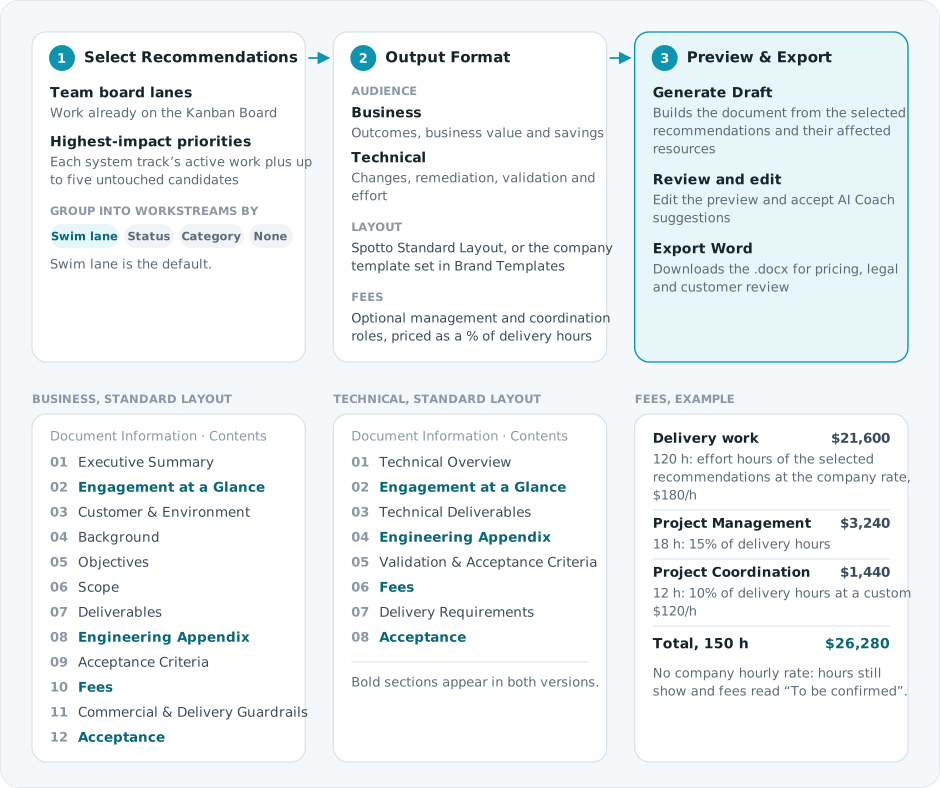
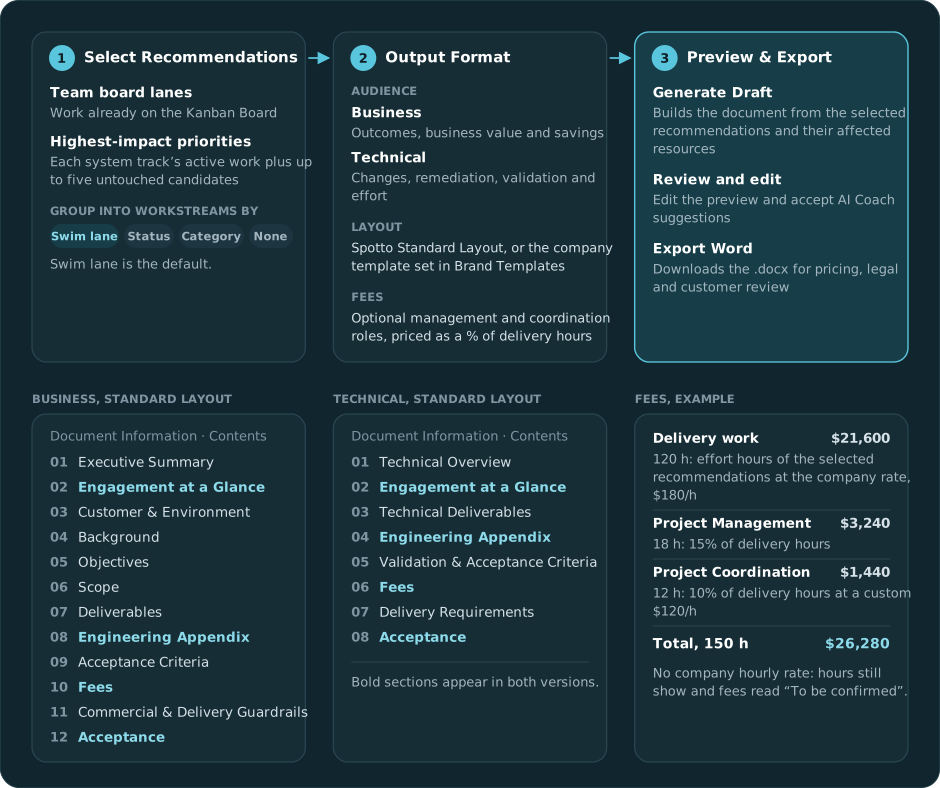
The company hourly rate comes from the company's details. The role presets start at Project Coordination 10%, Project Management 15% and Program Management 20%; change the percentage, set a custom rate, or add a custom role. A company template keeps its own structure and places SOW content where its placeholders sit, so review placement before sending.
Selecting recommendations
Select Azure subscriptions or AWS accounts to control which recommendations load. This selection does not add account or subscription metrics to the document. Only the recommendations you select are included.
For AWS, prioritize a recommendation from its details page or resource details. Its saved Kanban card then appears in Statement of Work while it remains unfinished and its current recommendation evidence is available. Findings with a reported affected-resource count but no collected resource details can still be selected; review that coverage before committing to delivery scope. Some supporting report evidence remains Azure-only.
Where one resource has alternative configuration recommendations, review their native source, target and migration requirements. Their standalone savings estimates must not be added together.
Team board lanes stay usable while generated priority data is loading or unavailable. Export to SOW on a Team board lane or system track opens this step with that row's eligible cards selected.
Selections follow the work, not the card's rank:
- Recommendation-level and resource-level cards keep their own scope. Cards that share recommendation wording but name different resources are separate selections.
- Refreshing generated priorities doesn't move a selection to a different card or duplicate it.
The selector uses the Kanban Board's eligibility rules. Dismissed candidates, Completed work, work already on a durable card, and exact matching external tickets are not offered again as untouched candidates, and the next eligible candidate can fill the five-card window. When Highest-impact priorities is disabled, only Team board work is selectable.
Troubleshooting
No prioritized recommendations are available
What you're seeing: The page shows no recommendations for the selected subscriptions.
Likely cause: The company or subscriptions have no Team board work or system-track candidates, or the recommendation query failed.
How to fix: Confirm the company and subscription scope, widen the selection, then retry loading recommendations.
Team work appears but system groups do not
What you're seeing: Team board lanes are available, but one or all Highest-impact priority groups are missing.
Likely causes:
- Generated priority data is still loading, incomplete, or unavailable for a selected subscription.
- No untouched candidates are left for that track after dismissal, Completed work, durable cards and external tickets are applied.
- Highest-impact priorities is not enabled.
How to fix: Continue with Team board work if it covers the engagement. If you need generated candidates, confirm the scope and retry after the latest scan completes. Use Recommendations for broader discovery and the Kanban Board to review ownership.
The SOW includes fewer items than expected
What you're seeing: The draft scope is smaller than the visible backlog.
Likely causes:
- Only selected recommendations are included.
- Each system track offers the same top-five untouched candidates as the Kanban Board, not the larger generated buffer.
- A dismissed, completed, durably owned or externally ticketed scope is not repeated, and another card may have taken its place.
How to fix: Return to Select Recommendations, expand the lane or track, clear filters, select the missing items and generate again. If priorities refreshed while you were selecting, check the recommendation or resource scope rather than its position in the group.
Template output needs cleanup
What you're seeing: Content is in the right document but needs wording or placement changes.
Likely cause: Uploaded templates vary, so Spotto uses placement suggestions instead of assuming a fixed structure.
How to fix: Accept useful AI Coach suggestions, edit the preview directly, then export the reviewed .docx.