Spotto Reporting: Create Editable SDM Reports
Overview
Service Delivery Reports turn the data already connected to Spotto into a customer-ready Word document for a reporting period.
Where to find it
Open a company and go to Generate → Documents → Service Delivery Reports. The report library lists saved reports by period. Start with New Report, or use Report Next Period on an issued report to carry its choices forward. Batch Reports exports the same period for several child companies.
How a report is built
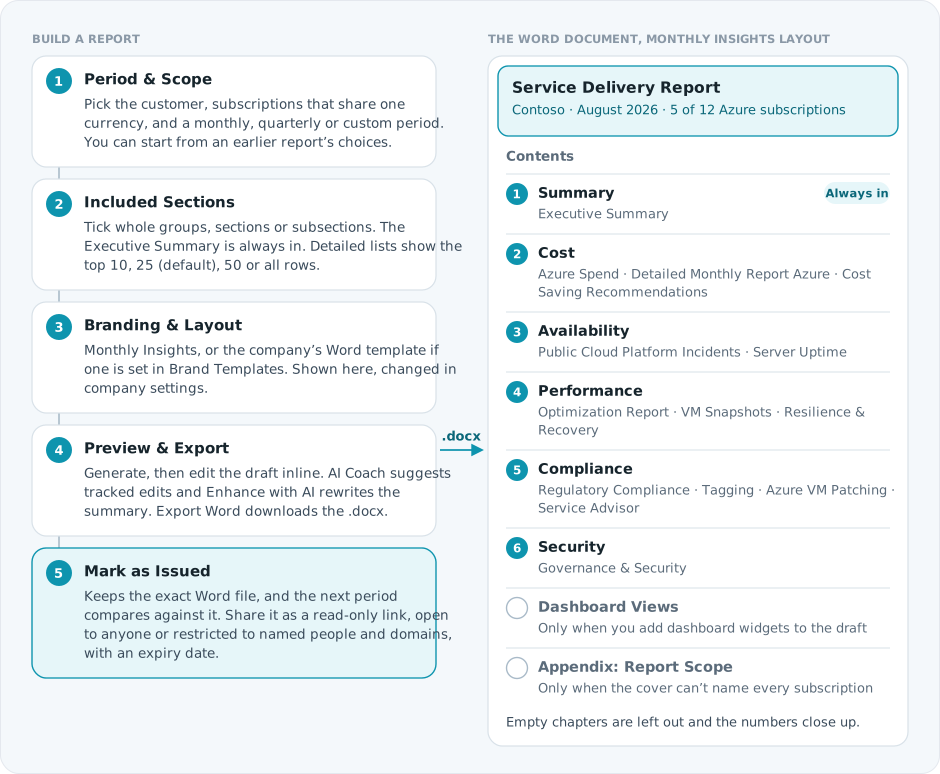
A company template keeps its own structure: download the starter from Brand Templates, arrange or remove its sections in Word, keep the placeholders Spotto should fill, then upload it. Company templates need the Branded Reporting feature set; without it, reports use Monthly Insights. Work Performed in the Period (visible PSA ticket activity for the period) prints only in a template that keeps its placeholder; Monthly Insights has no chapter for it.
Preview edits and AI Coach suggestions reach the .docx when Spotto can map them safely back to the Word document. Before sending, check customer-specific wording, commitments, dates and next actions.
Background reports
Background reporting requires the Report Scheduler company feature set, which is off and hidden by default. Enable it explicitly through the company's Feature Sets controls. With reporting and schedule access, open Generate → Report Schedules, then choose Background Reports. With reporting access and the feature set enabled, you can also use Background Reports in the Service Delivery Reports or Current State Analysis workspace. Choose New Background Report, select the report type and the company's Azure subscriptions. Service Delivery Reports need a reporting period. Current State Analysis requires a supported scope currency and valid company hourly-rate and prepared-by settings. Interactive reporting remains available under its existing permissions.
Submit the request and use the job details to follow generation and delivery separately. Processing continues after you leave the page. Automatic refresh stops after five minutes; Refresh checks again. A polling timeout does not mean the report failed. If the request was saved while processing was unavailable, keep that job and follow its status rather than submitting a replacement.
Submission errors identify missing report settings, unsupported currency, unavailable background reporting or the five-job generation limit. Correct the named setting or wait for an active job to finish before trying again. If the response cannot confirm whether the request was saved, check the job list before submitting a replacement.
Once generated, authorized users can download the stored Word Report, including while delivery is pending or after a delivery error. Background documents are Unreviewed. They do not become issued reports or comparison baselines. They use the standard background layouts; company Word templates, preview curation and AI coaching remain part of the interactive workflow.
Optional delivery
Users with schedule-management permission can select a company Action Group and confirm its email recipients before submitting. All email recipients appear together in To. The report is attached when it fits the email limits; larger files use a link requiring Portal sign-in. Slack, Teams and webhook destinations receive links. Delivery errors preserve the generated document and its download.
Action Groups are resolved when delivery runs. Review changes to a group used by reports or schedules: future deliveries use its current destinations. Once a delivery attempt has started, changed destinations are treated as a delivery error rather than silently replacing the recipient list mid-attempt.
To automate reports, use report schedules. Demo jobs show generation and delivery outcomes without generating, sending or downloading documents.
Billing coverage matters
Cost sections only use subscriptions with billing data for the period; everything else covers the full selected scope. Check the billing coverage notice before you export.
Data used
Spotto uses whichever connected signals are available for the scope, including recommendations, billing, Secure Score history, review checklists, service retirements, commitments, tickets and company objectives. If a signal is missing, the report shows a gap instead of making a claim.
Some sections need an extra Azure role on the cloud account. For example, Server Uptime reads each server's boot time and heartbeat from Log Analytics, so it needs Log Analytics Reader and servers that report to a workspace. See what each permission unlocks.
Utilisation sections
The Cost Optimization part of Cost Saving Recommendations starts with Oversized Resources and Schedule Candidates, followed by Other Recommendations. If an open recommendation covers a resource listed in Oversized Resources or Schedule Candidates, it appears on that resource's row as the Recommended Action and is not repeated under Other Recommendations. Savings estimates in these parts can overlap, so the report doesn't add them together. The headline savings figure is still the total of open recommendations.
Resilience & Recovery contains Backup Summary and Recovery Capabilities, which lists backup, replication and other recovery capabilities for each resource.
These sections use the same scan data as the At a Glance story pages, but show up to 50 resources per resource type and say how many were left out. Resources with no telemetry appear under Billed but Not Observed. Subscriptions not scanned since this change show awaiting the next scan.
Troubleshooting
The report says data is pending
What you're seeing: Generation stops with a message that Spotto is still loading named data, and no report is generated.
Likely cause: One or more sources did not settle before the readiness limit.
How to fix: Wait a moment, then generate the report again.
Cost sections cover fewer subscriptions than selected
What you're seeing: Cost commentary covers fewer subscriptions than you selected.
Likely cause: Some selected subscriptions do not have billing data for the selected period.
How to fix: Check the billing coverage notice, change the period, or wait for billing data to complete.
An edit is missing from export
What you're seeing: A preview edit is missing from the exported Word document.
Likely cause: The edit changed the preview structure enough that Spotto could not map it safely back to the Word document.
How to fix: Keep edits to existing body paragraphs where possible, then export again.