Notes: Customer Context for Cloud Teams
Overview
Notes give your team one place, next to the cloud data, for the customer context that usually lives in someone's head, a ticket comment or a meeting transcript: goals, constraints, decisions and known exceptions. Cloud data explains what exists and what changed. Notes explain why it matters, and they give Spotto Chat the customer's priorities as well as its telemetry.
Where to find it
Open a company and go to Generate → Notes. Notes are saved against the company you're viewing, so confirm you're in the right customer before adding anything. Yes, that sounds obvious. It is still how bad notes happen.
How notes work
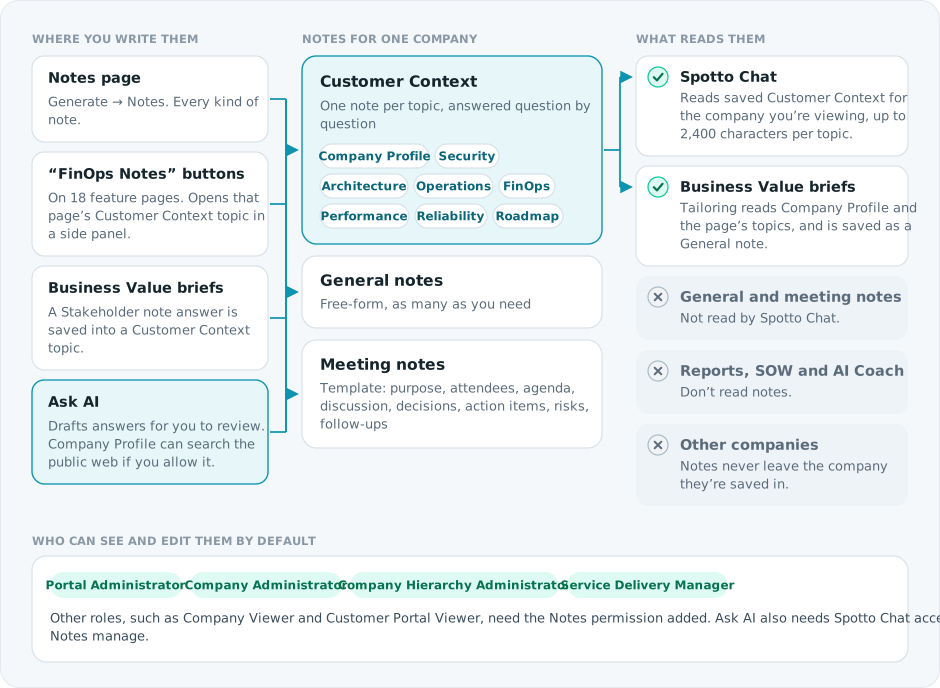
As a rule of thumb, put stable customer context in its Customer Context topic, discussion history in Meeting notes, and one-off observations or drafts in General notes. Notes are not a replacement for tickets, change records or architecture decision records.
Customer Context topics
Each topic gives engineers a predictable place to look, so a security specialist doesn't have to read six meeting notes and guess which one mattered.
| Topic | What it holds |
|---|---|
| Company Profile | Who the company is, what it does, stakeholders, and public research with source links |
| Security | Security objectives, compliance targets, accepted risks and control priorities |
| Architecture | Platform design, critical systems, dependencies, constraints and standards |
| Operations | Operating model, change and release process, support, maintenance and ownership |
| FinOps | Cost priorities, budgets, commitment strategy and optimization preferences |
| Performance | Performance expectations, workload sensitivity and known bottlenecks |
| Reliability | Availability targets, recovery expectations, backup posture and resilience risks |
| Roadmap | Planned changes, migrations, renewals and strategic initiatives |
Ask AI
Ask AI drafts note content from the context already in Spotto. In a Customer Context note, section-level Ask AI works on one topic area rather than rewriting the whole page. Review suggestions before applying them; accepted suggestions are saved through the normal Notes save. The goal is to reduce blank-page work, not to outsource customer knowledge to a sentence generator with a nice button.
Allow internet search is off by default and only available for Company Profile. When you turn it on for a request, Spotto looks up public company information, such as website, industry, products and positioning, and returns source links so you can check what was used. It needs the company website on the company details page. Don't put private customer data into the prompt to make a public lookup easier.
Why it matters in Spotto Chat
If the Security topic says the customer is preparing for an audit, a security recommendation isn't just another control item. It has timing, stakeholder and risk context. The same applies to FinOps constraints, reliability targets, roadmap dependencies and operational ownership. Before asking Spotto Chat prioritization or planning questions, check that the relevant topics are filled in.
Why use this? (Jobs, pains, gains)
Jobs to be done
- When I review a customer environment, I want to see the customer's objectives and constraints, so I can interpret recommendations in the right context.
- When I ask Spotto Chat a question, I want it to understand saved customer context, so answers aren't based on telemetry alone.
- When another engineer has already learned something about the customer, I want it visible by topic, so I don't rediscover it in a call or ticket.
Common pains this fixes
- Customer context is scattered across tickets, calls, documents and individual engineers.
- Recommendations look technically correct but miss the customer's real priorities.
- Handover quality depends on who happens to be online.
What you gain
- Customer-specific context that lives with the rest of the Spotto workflow.
- Less knowledge-silo risk when engineers change shifts, teams or accounts.
- More useful Spotto Chat answers and cleaner preparation for reviews and QBRs.
Suggested workflows
Start with Company Profile
For a new customer, record what the company does, its website and public sources, and the products, services, regions or operating details that help engineers understand it. This gives future notes a basic identity layer.
Build out topics during reviews
During reviews or onboarding, fill in the topics that matter first (often Security, FinOps, Reliability or Operations) with the customer's objectives, constraints and known exceptions. Keep the wording practical enough that another engineer can act on it later.
Turn meeting notes into durable context
After a customer meeting, save the discussion as a Meeting note, move stable facts into the relevant Customer Context topic, and keep action items in the system your team uses for work tracking. The meeting note records the conversation; Customer Context records the durable knowledge.
Regulatory compliance notes
The Azure Policy Regulatory Compliance guide has a separate notes workflow for an assigned initiative, control or contributing policy. These notes keep decisions, owners, evidence gaps and next steps beside the evidence being reviewed. They are not added to the Notes page and are not written to Azure.
Regulatory notes can use Draft With AI, but a person must review and save the result. Users with Governance manage access can permanently delete an individual note. Deleting the Azure cloud account permanently removes regulatory notes for its subscriptions from Spotto as part of account cleanup; Azure Policy resources are unaffected.
Security and data handling
Notes can contain sensitive customer context, so treat them like operational records, not scratch paper. Use public research for public company facts only, and review AI suggestions before applying them, especially when a note influences customer recommendations.
Limitations
- Notes are only as useful as what the team records.
- Public Company Profile research depends on the company's website and available public sources.
Troubleshooting
I cannot see Notes
What you're seeing: Notes is not in the Portal navigation.
Likely causes:
- You are in the wrong company context.
- Your role does not include Notes access.
- The feature is not enabled for that company.
How to fix:
- Confirm you are viewing the correct company.
- Ask a company administrator to check your access.
- If access looks correct but the page is still missing, contact support with the company name and a screenshot.
Ask AI is not visible in Notes
What you're seeing: You can view or edit notes, but there is no Ask AI button.
Likely causes:
- AI chat is not enabled for the company, or your role can't use it.
- Your role can view Notes but cannot manage them.
- The selected note type or state does not support AI suggestions.
How to fix:
- Confirm Spotto Chat is available elsewhere for the same company.
- Ask an administrator to check both AI chat access and Notes manage permission for your role.
- Continue editing manually if AI chat access is intentionally disabled.
Company Profile research asks for a website
What you're seeing: AI says to add the company website before it can research the profile.
Likely cause: Public research needs a reliable website so it searches for the right organization instead of guessing from a name.
How to fix: Add or correct the website on the company details page, then retry the Company Profile request with Allow internet search turned on.
Notes feel duplicated across topics
What you're seeing: The same customer context appears in several notes.
Likely causes: Meeting notes were never distilled into Customer Context, or a broad General note now belongs in a specific topic.
How to fix: Keep the original Meeting note if it records useful history, move stable facts into the right topic, and use General notes only for context without a clear home.
Looking to enhance your cloud setup for cost efficiency, performance, reliability, or security?
Talk to a cloud specialist. Email us or schedule a 30-minute consultation and let's optimize your cloud environment together.
Book a Free Consultation