Azure and AWS Health: Incidents and Resources
Overview
Health in Spotto brings Azure and AWS service incidents, maintenance and advisories into the same page for the subscriptions and accounts you select. Review affected services, regions and resources, incident timing, source coverage and provider-published details. Azure also provides resource availability; AWS resource availability is currently unassessed.
It complements Change Monitoring: Change Monitoring explains what changed inside a subscription or account; Health explains the collected provider incidents that may have affected it.
Where to find it: In the Spotto Portal sidebar, go to Investigate -> Cloud Estate -> Health.
How it works
Azure collection
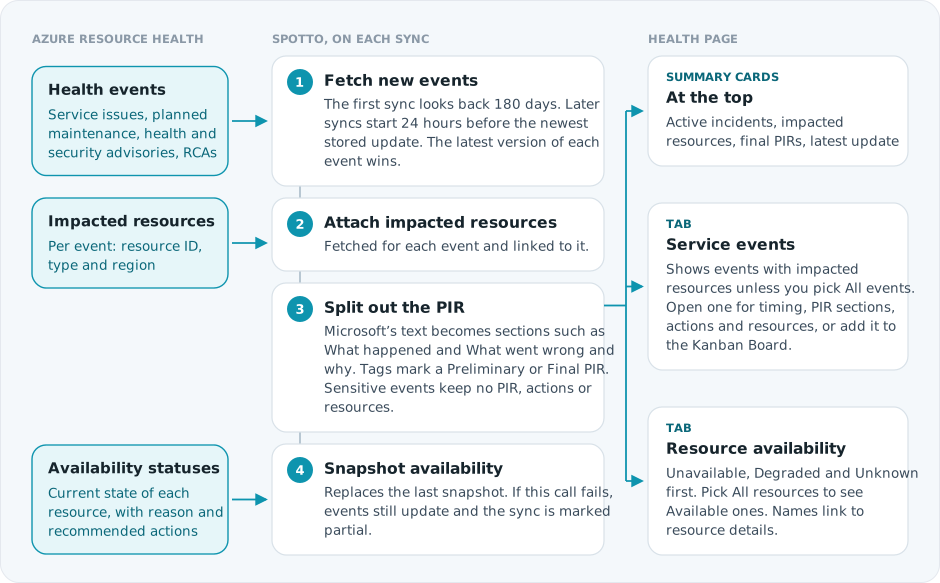
Spotto collects Azure Resource Health data for each subscription on every sync and shapes it into the page.
AWS service events
When AWS Health support is enabled, the account sync collects account-specific incidents, scheduled maintenance and account notifications from the AWS Health API. Events use the same table and detail view as Azure, with Active, Upcoming, Resolved or Unknown status. Upcoming maintenance is separate from active incidents.
The page keeps notices visible even when an affected entity cannot be matched to collected resource inventory. A known affected-resource count can exceed the list of retained matches; missing resource identities are not invented. Existing AWS Health collection for Retirement Tracker continues independently.
AWS API collection needs an eligible support plan and read permissions. This collection covers account-specific events, not public regional events or organization-wide aggregation. EventBridge forwarding is not part of this initial source. See AWS Health access.
AWS resource availability currently shows an explicit coverage limitation. No incidents, an empty resource list, or an unsupported collector does not establish that resources are healthy.
Why use this? (Jobs, pains, gains)
Jobs to be done
- When an outage is reported, I want to see whether Azure published a related incident, so I can separate platform impact from tenant-side changes.
- When Microsoft publishes a post-incident review, I want the RCA/PIR sections in the same place as the affected subscription context, so I can brief teams without rebuilding the timeline by hand.
- When a resource is degraded or unavailable, I want a resource-level view with links back to Spotto resource details, so ownership and remediation are easier to follow.
Common pains
- Azure Service Health and Resource Health answer different questions, and switching between them during an incident is not anyone's idea of a good time.
- Activity logs show management operations, but not the full customer-facing incident summary, impact window, PIR tags, or recommended actions from Microsoft.
- Resource-level health can be missed when the subscription-level incident has already moved to Resolved.
Turn the evidence into a decision
Select the labelled briefcase Business Value button beside Notes. The brief combines live incident, impacted/unavailable resource, and post-incident review facts with a resilience decision.
Technical severity does not establish business criticality; validate that context with service owners. Generate tailors only the narrative for permitted users and saves it to the exact scope. Clear removes that saved narrative and immediately restores the standard Business Value content without deleting Customer Context or changing live facts. Regenerate when evidence changes. Above 100 subscriptions, the curated live brief remains available without tailoring.
Current position and priority work
Stabilize active incidents according to business-service priority, then turn recurring events and post-incident findings into owned resilience improvements.
Business outcomes
Health review connects Azure incidents and resource availability to services, users, and recovery commitments. That connection helps teams restore the most important services first and fund resilience improvements from real incident evidence.
Cost of delay
Technical severity alone may not reveal business criticality, which can prolong customer impact or misdirect response effort. Repeated failure patterns may continue when PIR actions are not assigned, funded, and tracked.
Decision required
Confirm service priority, approve the immediate recovery and follow-up work, and assign owners and dates to post-incident actions.
Validate with stakeholders
When you can manage Company Notes, select any question in the portal to retain the answer in the relevant Customer Context note.
- Which business services and users are affected?
- What availability commitments, workarounds, and escalation thresholds apply?
- Which PIR actions require an owner and investment decision?
Key capabilities
Select subscriptions and accounts to scope the view
Use the selector at the top of the page to choose Azure subscriptions and AWS accounts that are ready for review. In a company hierarchy, results retain their owning company and account; access limitations remain visible alongside readable results.
Review incidents
Events are sorted by latest update, newest first. Each row in the Service events tab shows the event title, subscription or account, last update, event type, status, and level when provided. Provider-published reviews can carry a Preliminary PIR or Final PIR badge; missing severity or review content remains absent.
Select an event to open its details: impact start, mitigation time, last update, duration, summary, impacted services and regions, recommended actions, and impacted resources. Provider-published post-incident reviews can also show What happened, What went wrong and why, How the provider responded, How the provider is reducing recurrence and How customers can reduce impact. Existing Azure review content is retained. Spotto does not synthesize missing review sections or recommended actions for AWS events.
Use the star on an event to add it to the Kanban Board as a reliability work item, or share the event from its details.
Review current resource availability
Each row in the Resource availability tab shows the resource name, type and subscription, its health state and title, the reason and summary, recommended actions, the time Azure reported it, and how many service events are linked to it.
AWS accounts show their availability collection limitation in this tab until native resource-status collection is supported. An unassessed account is not reported as having zero unavailable resources.
Search and filter
Search matches events by title, summary, type, status, level, service, region, subscription or recommended action, and resources by name, ID, type, subscription, state, reason, summary or recommended action.
The filters switch between:
- All, active, upcoming and resolved events
- Events with impacted resources, or all events
- Impacted (not Available), Unavailable, Degraded, Unknown or all resources
How it differs from Change Monitoring
| Question | Use |
|---|---|
| "Who changed this resource or subscription setting?" | Change Monitoring |
| "Did the provider report an incident, outage, maintenance event, or RCA?" | Health |
| "Which resources are currently degraded, unavailable, or recently impacted?" | Health |
| "Was there a failed deployment, policy assignment, or administrative operation?" | Change Monitoring |
Activity logs can contain health-looking categories, but they are compact management events. Health keeps the Service Health and Resource Health fields such as impact windows, impacted services and regions, PIR tags, article content, recommended actions, and availability status.
Coverage and limitations
- Azure event history starts 180 days before the subscription's first health sync. Older Azure events are not collected.
- Some events are subscription-level only and have no impacted resources list.
- Resource availability is a snapshot from the latest sync. If Azure health changes after that, wait for the next sync.
- Sensitive advisory details may require additional Azure permissions and may not be visible in every environment.
- AWS event coverage names the categories and account scope that were collected. Complete collection within those filters does not establish complete regional or workload health coverage.
- Collection coverage and freshness are separate. A failed refresh can retain older events with stale coverage; publishing the page again does not make those observations current.
- Publication and source limits can retain a bounded set of events or matched resources. Partial coverage remains visible when details are omitted.
- Missing or uncollected evidence is not a successful empty collection. Review source limitations before interpreting an empty table.
Permissions and access
Health uses the same Spotto portal access as Change Monitoring. If a user cannot access Change Monitoring for a company, they will not see Health.
For Azure collection, Spotto needs read access to Resource Health data, including:
Microsoft.ResourceHealth/events/readMicrosoft.ResourceHealth/events/impactedResources/readMicrosoft.ResourceHealth/AvailabilityStatuses/readMicrosoft.ResourceHealth/AvailabilityStatuses/current/read
AWS reads also require access to the AWS connection in Spotto. Provider collection needs health:DescribeEvents, health:DescribeEventDetails and health:DescribeAffectedEntities, plus an eligible AWS support plan. Health API access and permission gaps are shown as source limitations rather than successful empty results.
Troubleshooting
The Health page is empty
What you're seeing: The page shows no Service Health events or Resource Health availability statuses.
Likely causes:
- No subscriptions are selected.
- The selected subscriptions are not ready yet.
- Azure has no health events or availability statuses for the selected subscriptions.
- The Service events tab is showing only events with impacted resources.
- Resource Health permissions are missing from the cloud account.
How to fix:
- Select at least one ready subscription.
- Wait for the cloud account sync to complete.
- Switch the event filter to All events and the resource filter to All resources.
- Confirm the Azure role assigned to Spotto includes the Resource Health read permissions listed above.
PIR or RCA sections are missing
What you're seeing: An event appears, but fields such as "What happened" or "What went wrong and why" are blank.
Likely causes:
- Microsoft has not published a preliminary or final PIR for that event.
- The event type does not include post-incident review sections.
- The event has only summary, update, or article content.
- Azure marks the event as sensitive.
How to fix:
- Check whether the event has a Preliminary PIR or Final PIR badge.
- Review the event summary and recommended actions.
- Recheck after Microsoft publishes the final update.
AWS source coverage is unavailable or resource availability is unassessed
What you're seeing: AWS service events carry a source limitation, or the Resource availability tab says availability has not been assessed.
Likely causes:
- The operational Health source has not been collected and published yet.
- Health API permissions or support-plan entitlement are missing.
- A failed refresh retained older source evidence.
- Native AWS resource availability is outside the current collection scope.
How to fix:
- Confirm the AWS account connection and Health API access.
- Run the account sync with the Health-capable engine and wait for its source collection and views publication.
- Review the last successful source refresh and any partial or stale coverage.
- Treat unassessed resource availability as a collection gap; use workload monitoring for resource-status decisions.
A resource is affected but does not link to a resource detail page
What you're seeing: An impacted resource appears as text, but there is no usable Spotto resource link.
Likely causes:
- Azure did not provide a
targetResourceIdfor the impacted resource. - The resource is outside the selected subscriptions or has not been collected into Spotto inventory.
- The resource was deleted before the latest inventory sync.
How to fix:
- Search for the resource by name or ID in Cloud Resources.
- Select the subscription that owns the resource.
- Refresh after the next inventory sync if the resource was recently created or restored.
Resource Health says Available but users still reported impact
What you're seeing: Resource availability rows show Available, but users reported downtime or degradation.
Likely causes:
- The impact was transient and resolved before the latest sync.
- The incident affected an upstream dependency rather than the resource directly.
- The issue was tenant-side, such as a deployment, policy, network, or identity change.
How to fix:
- Check Service Health events for the same time window.
- Review Change Monitoring for deployments or administrative changes around the incident.
- Check resource metrics and logs for tenant-side symptoms.
Looking to enhance your cloud setup for cost efficiency, performance, reliability, or security?
Talk to a cloud specialist. Email us or schedule a 30-minute consultation and let's optimize your cloud environment together.
Book a Free Consultation