Tickets: Integration Ticket History
Overview
The Tickets page lists every ticket Spotto created in Jira, Autotask, Halo or ConnectWise, with its current status. Find it under Tasks -> Review -> Tickets.

What you can do
- Show tickets from the last 7, 30, 90 or 180 days. The default is 30 days.
- See each ticket's ID, title, resource, subscription, status and creation time.
- Open the ticket in your tool from its ID, or open the related item in Spotto with Open resource.
- Click a row for details: provider, who shared it, the share message, and the score, impact, risk and effort.
How tickets get here
A ticket is listed when someone shares a recommendation or a Kanban board card to the company's ticketing tool.
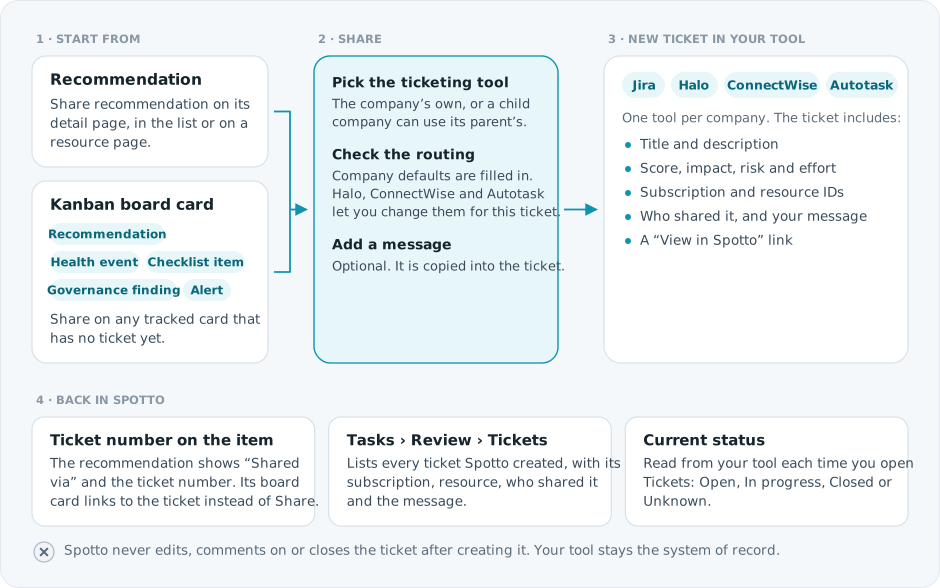
Tickets created directly in your tool, and email shares, are not listed. To set up a tool, see Jira, Halo, ConnectWise or Autotask.
Troubleshooting
I don't see any tickets
Likely causes: nothing was shared to a ticketing tool in the selected date range, you're in the wrong company, or the item was shared by email.
How to fix:
- Widen the date range.
- Confirm you're in the right company.
- Share a test recommendation to a ticketing tool.
Status shows Unknown or Error
Likely causes:
- The tool doesn't report a category for that status.
- Spotto couldn't reach the tool with the stored credentials.
- A Halo or ConnectWise ticket was created with the parent company's credentials, and you don't have view access to the parent's PSA Integration.
How to fix:
- Check the credentials in Connectors -> PSA Integration.
- Retry later if the tool is having an outage.
- For parent-credential tickets, ask a parent-company admin for view access to its PSA Integration.