Azure and AWS Backup Review: Health and Cost
Overview
Backups shows coverage, health, vault and policy, and cost for the Azure subscriptions and AWS accounts you select. It answers which resources are protected, which backups are failing and since when, which vault and policy protect each resource, what existing backups cost over the last 30 days, and what unprotected resources would likely cost to back up.
How each resource is rated
Spotto combines backup data from several Azure sources and gives every resource one status.
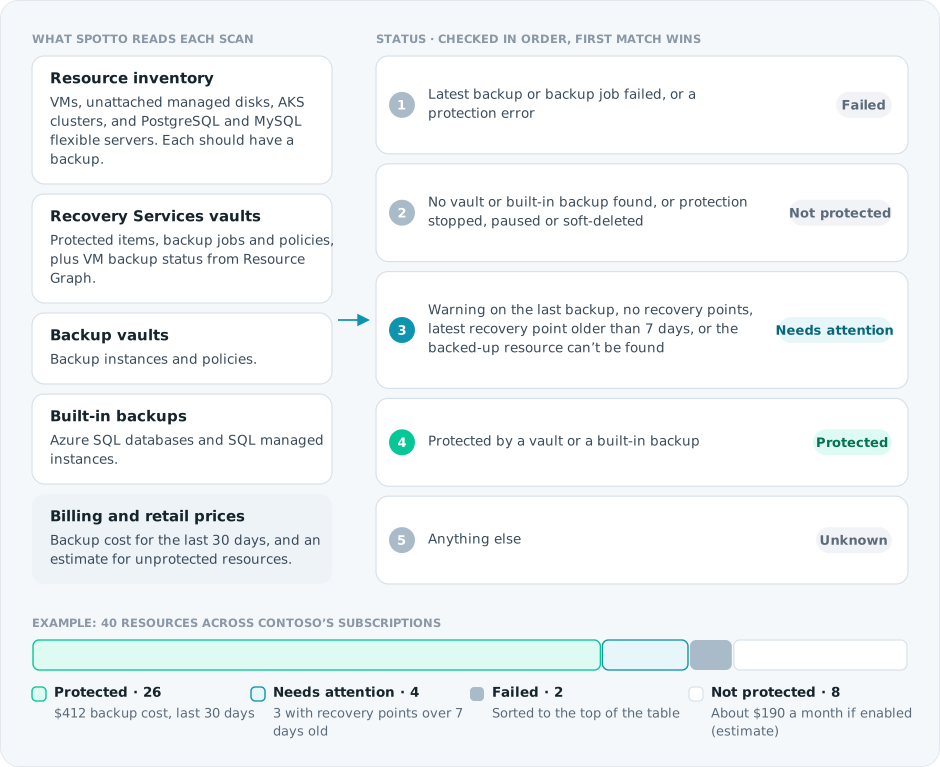
Azure can keep failed job history after a later backup succeeds, so a historical failed job alone does not make a resource Failed. The status uses the latest backup, the latest job, and the current protection state.
Turn the evidence into a decision
Select the labelled briefcase Business Value button beside Notes. The brief combines live protected, failed, unprotected, stale, and estimated-cost evidence with a priority body of work.
Live facts are deterministic; estimates remain labelled and mixed currencies are never combined. Generate tailors only the narrative for permitted users and saves it to the exact scope. Clear removes that saved narrative and immediately restores the standard Business Value content without deleting Customer Context or changing live facts. Regenerate when Spotto reports that evidence changed. Above 100 subscriptions, curated live guidance remains available without AI or persistence.
Current position and priority work
Start with the failed and unprotected workloads named in the brief, then investigate stale recovery points and prove the critical restore paths. The names come from the same ordered rows as the backup table; Spotto still asks you to confirm business criticality rather than assuming it from technical status. Coverage alone does not prove that a service can be restored within an acceptable time.
Tag resources by business criticality, recovery tier, service owner, environment, and cost allocation. This makes the protection standard and restore-test cadence explicit, and helps teams find gaps when services change ownership or new resources are deployed.
Expected change
For unprotected resources, the brief shows current protection coverage → projected coverage if every currently unprotected resource in scope is enabled. It also shows the existing estimated monthly enablement cost when the scope has one currency. Mixed-currency scopes keep estimates separate at resource level instead of creating a false total.
This completes the technical side of the case: coverage gained for the estimated recurring cost. The financial consequence of downtime or data loss remains unvalued until the customer supplies service criticality, recovery time and recovery point objectives, and an agreed cost of interruption. Failed and stale backups also remain separate work; enabling protection does not prove recoverability.
Business outcomes
Backup investment creates value when priority services can be restored within agreed recovery time and recovery point objectives. The review connects coverage and failures to operational continuity rather than treating backup configuration as the finish line.
Cost of delay
Ransomware, deletion, corruption, or a platform incident could exceed acceptable data-loss and downtime limits. Unprotected data may be permanently lost, while failed or stale backups can provide false confidence until a restore is urgently required.
Decision required
Approve the priority recovery scope, accountable service owners, required restore tests, and acceptable recovery cost.
Validate with stakeholders
When you can manage Company Notes, select any question in the portal to retain the answer in the relevant Customer Context note.
- Which services are business-critical, what are their recovery time and recovery point objectives, and how are they identified through resource tags?
- When was each critical restore path last tested successfully?
- Who accepts the trade-off between recovery cost, recovery speed, and retained history?
Where to find it
In the Spotto Portal, open a company and go to Tasks -> Review -> Backups.
Use the subscription selector at the top of the page to choose the subscriptions you want to review. It behaves like the selector on other subscription-scoped pages, including URL and saved selection state.
Key capabilities
Backup posture summary
The summary cards show:
- Protected: resources with active vault or built-in backup protection.
- Failed Backups: resources with a current failed backup signal or active failure history.
- Not Protected: resources that should have a backup but do not appear to.
- 30 Day Backup Cost: observed backup cost from the last 30 days.
- Estimated Monthly If Enabled: estimated monthly cost if currently unprotected resources were backed up.
Billed and estimated costs are grouped independently by currency. If a cost measure spans different currencies, its aggregate card shows Mixed; use the table for per-resource review.
Resource-level backup table
Each row shows:
- Resource name, type, and subscription.
- Backup status.
- Latest backup or recovery point time.
- Failure summary, failed-since date, and consecutive failure count when available.
- Recovery Services vault, Backup vault, and policy details when available.
- Observed 30-day backup cost.
- Estimated monthly backup cost if the resource is not currently protected.
Failed rows are sorted to the top. You can search by resource, vault, policy, subscription, status, or resource ID. When Azure supplies job details, the row also shows the latest failed job, so you can tell a one-off failure from an ongoing one.
Backup cost review
For protected resources, Spotto uses the subscription's billing data and allocates backup cost where possible, shown with the subscription currency code and symbol.
For unprotected resources, Spotto estimates monthly backup cost using available resource characteristics and regional retail pricing. Billed-cost confidence is shown as exact, allocated, estimated, or unavailable; estimate availability is shown separately as available, partial, or unavailable.
AWS snapshot estimates describe a daily, same-region, warm-storage policy with 30-day retention. Open the estimate details to see the storage rate, resource-size assumptions and change-rate range. EC2/EBS capacity is a conservative sizing input; EFS uses collected storage bytes. RDS estimates are partial when the shared regional backup-storage allowance is unknown. Aurora and ElastiCache show pricing details without a monthly amount when dataset size is unavailable.
DynamoDB continuous-backup estimates model native point-in-time recovery (PITR). They use measured table and local secondary index bytes and the regional PITR storage rate; global secondary indexes are excluded. The monthly assumption holds the observed size constant. PITR is not a set of daily snapshots, and its price does not scale with the configured recovery-window length. Missing size or rate evidence stays unavailable. Review the quote's assumptions before enabling protection; billed backup spend and proposed estimates remain separate.
AWS protection counts use workload units. Inherited Aurora member rows remain available for inspection without becoming additional protected workloads or duplicating their parent's billed backup cost in exports.
EC2 estimates exclude storage already protected through individual EBS backups. When the attached-volume inventory is incomplete or native snapshots/DLM evidence leaves protection uncertain, the instance is shown as Unknown; confirmed unprotected volumes can still be reviewed individually. A retained snapshot alone does not establish a configured recovery policy.
Retail estimates carry their own currency, which can differ from billed spend. A complete estimated total is shown only when every unprotected resource in the loaded selection has an available estimate in one currency. Partial or missing estimates remain visible in resource details and are excluded from complete budget claims in reports.
Billed totals also require complete selected-account evidence and matching regional billing windows. Failed or missing account reads retain available resource details without presenting them as a complete selection total. Report cost tables identify amounts for loaded resources and exclude account charges that could not be attributed to a resource.
AWS backup charges may be billed under AWS Backup or the underlying service. Costs with an exact resource association appear on that resource; unattributed charges remain at account scope. Existing billing imports need rebuilding to include newly recognised native backup meters. A completed account refresh supplies updated pricing evidence.
Supported protection sources
Backups combines multiple data protection sources when they are present in the latest scan:
-
AWS Backup protected resources and recovery points.
-
Native RDS/Aurora automated backups and eligible ElastiCache snapshots, including serverless Memcached.
-
Native DynamoDB continuous backup/PITR status and measured table/index size.
-
Current AWS EC2/EBS/EFS inventory and regional backup-pricing evidence.
-
Recovery Services vault protected items and backup jobs.
-
Azure Backup vault backup instances.
-
Platform-native backup signals for supported services, including Azure SQL where available.
-
Backup-eligible resource inventory, such as virtual machines, disks, AKS, database services, and storage services supported by the current data set.
Technical reference
| Component | Details |
|---|---|
| Cost handling | Existing backup cost comes from collected billing data. Estimates use retail pricing where a supported workload and pricing match are available. |
| Currency handling | Resource rows show the currency supplied for that subscription. Cost cards are only summed when the selected subscriptions share one currency. |
| Refresh | The page reflects the latest completed scan for each selected subscription. |
How it differs from Azure portal views
Azure portal backup views work well when you already know which vault or resource to inspect. Spotto Backups is built for review across subscriptions: it starts from resources rather than vaults, lists unprotected resources next to protected ones, combines backup health with cost, and links each failure to its resource, vault, and policy.
Troubleshooting
The page shows no backup posture data
What you're seeing: The table is empty or shows the backup posture empty state.
Likely causes:
- The selected subscriptions have not completed a data protection scan yet.
- No ready subscriptions are selected.
- The cloud account does not have enough permissions to collect the required Azure backup data.
How to fix:
- Confirm the subscription selector includes the subscriptions you expect.
- Check cloud account sync status in Connectors -> Cloud Accounts.
- Confirm the Azure cloud account has read access to backup, resource, and billing data.
- Re-check after the next scan completes.
A protected resource shows no cost
What you're seeing: A protected backup row shows N/A for 30-day cost.
Likely causes:
- The billing export did not include identifiable backup meter rows for that resource or vault.
- The backup cost was bundled or could not be allocated confidently.
- Billing data for the last 30 days is not available for the subscription.
How to fix:
- Confirm subscription cost visibility is enabled.
- Review the subscription's billing sync status.
- Check whether the vault has shared backup meters that need allocation rather than direct resource matching.
Estimated cost is unavailable
What you're seeing: An unprotected resource shows N/A or an unavailable estimate.
Likely causes:
- The resource type is not yet supported by the backup pricing model.
- Required sizing data, such as protected disk size, backup storage quantity, region, or workload shape, is missing.
- Azure retail pricing did not return a matching meter for the workload and currency.
How to fix:
- Confirm the resource has complete inventory data in Spotto.
- Check that the resource region and workload type are supported.
- Treat unavailable estimates as review items rather than zero-cost backups.
A failure looks historical
What you're seeing: A row has latest failed job details, but the latest backup status is healthy.
Likely cause: Azure can retain failed job history even after a later backup succeeds.
How to use it:
- Check the Status column first.
- Use the failure detail as context when the status is Failed or Needs Attention.
- Review the vault job history if you need the full incident timeline.
Looking to enhance your cloud setup for cost efficiency, performance, reliability, or security?
Talk to a cloud specialist. Email us or schedule a 30-minute consultation and let's optimize your cloud environment together.
Book a Free Consultation